
The Stealthy Atroposia RAT

This report discusses Atroposia, a new Remote Access Trojan (RAT) that has gained attention in underground forums. The malware is promoted as a multi-functional platform for remote control, data exfiltration, and stealth operations. It features advanced persistence and evasion tactics, along with a full C2 console for data exfiltration. The developer behind this tool also offers customer support and additional services via a public website and Telegram.
What is Atroposia RAT
As I stated in the beginning of the report, the Atroposia RAT is a RAT that has multiple modules available to threat actors. Below is a list of modules the RAT is built with:
- Credential and Wallet exfiltration: The malware has the ability to steal sensitive information from the user’s bank sites as well as sites holding cryptocurrency.
- Hidden RDP (HRDP): One of the key features of this malware is its ability to spawn an invisible remote desktop session in the background. This allows the attacker to view and control applications on the user's desktop without alerting them.
- Clipboard Monitoring: Copies login credentials and sensitive information into an obfuscated text file for exfiltration to the C2.
- Vulnerability Scanning: The malware includes a built-in vulnerability scanner that identifies weaknesses within the user's organization. Attackers can use this scanner to discover opportunities for lateral movement or privilege escalation.
- Persistence/UAC Bypass: The RAT establishes persistence primarily by installing a scheduled task on the user's machine. An additional mechanism elevates privileges through User Account Control (UAC) bypass to gain administrator rights and modify system settings.
- File Manager/Grabber: Provides complete remote file system access, including browsing, searching by file type or keyword, and stealthy data exfiltration. Once collected, data is compressed into a password-protected ZIP archive in memory to evade detection.
Distribution
Atroposia RAT is offered as Malware-as-a-Service (MaaS) through a three-tier subscription model with the following pricing:
- 200 1 month
- $ 500 3 months
- $ 900 6 months
Atroposia RAT Architecture
Atroposia uses a client-server architecture with a modular design that allows threat actors to build custom payloads and execute stealthy attacks. The system has two primary components: the client-side, which infects the compromised machine, and the server-side, which the threat actor operates and controls.
Atroposia has emerged as one of the most concerning threats in the cyber-criminal underground. This new remote access Trojan offers an unprecedented combination of stealth capabilities and attack features. In addition, it operates as a turnkey criminal toolkit designed to lower the technical barrier for threat actors of varying skill levels.
Infection Chain
The Atroposia RAT infection chain relies primarily on social engineering to deceive users into installing the malware. Below is a breakdown of the infection process:
- Initial Access:
- Phishing emails: The RAT is often spread through large-scale spam campaigns involving deceptive emails disguised as official, important, or urgent messages.
- Malicious attachments: Emails contain infectious attachments or links leading to malicious websites or downloads. Attachments can be in various formats, such as archive files, executables, PDFs, or Microsoft Office documents.
- Deceptive websites and downloads: The malware can be distributed via untrusted download channels, such as unofficial and free file-hosting sites.
- Execution:
- The user opens the attachment or clicks a malicious link.
- The malware uses a crypter to obfuscate the binaries.
- Atroposia silently installs itself on the system, often disguised as a legitimate application or system file to remain undetected.
- Command and Control (C2):
- Once installed, the RAT establishes a connection with the C2 server.
- It sets up the channel over a TCP port.
- The attacker uses Atroposia's modular capabilities for various malicious activities:
- Data theft
- Remote control
- Lateral movement
- Deploying additional malware
Atroposia RAT Analysis
I navigated to the site and was immediately presented with Atroposia's main page. The top right corner displays a Login page.
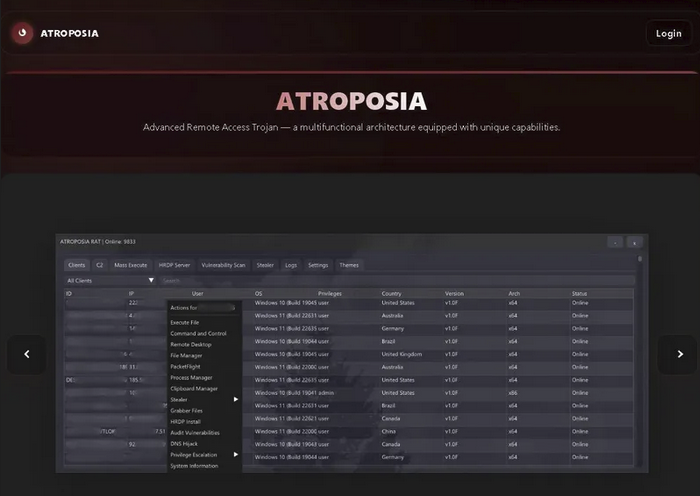
The image above shows several features available to threat actors:
- Clients
- C2
- Mass Execute
- HRDP Server
- Vulnerability Scan
- Stealer
- Logs
- Settings
- Themes
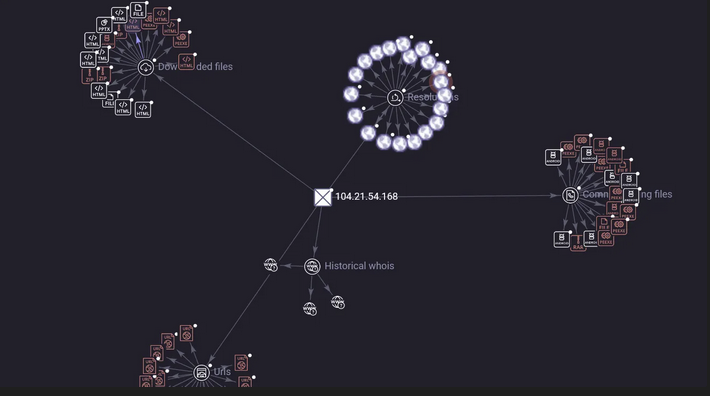
Further investigation revealed that the stealer site is hosted on Atroposia[.]lol, which has a VirusTotal score of 60/100. The domain was created 41 days ago and uses a CDN to mask traffic, making the IP appear benign and evading network detection.
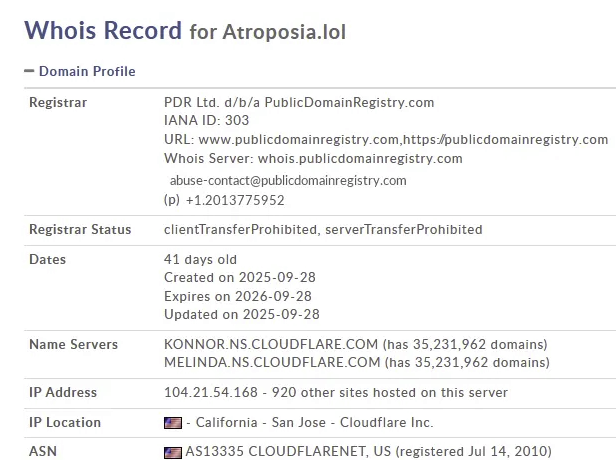
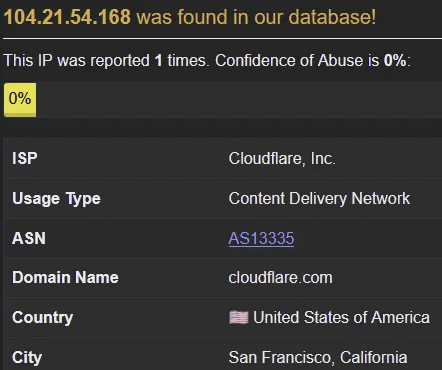
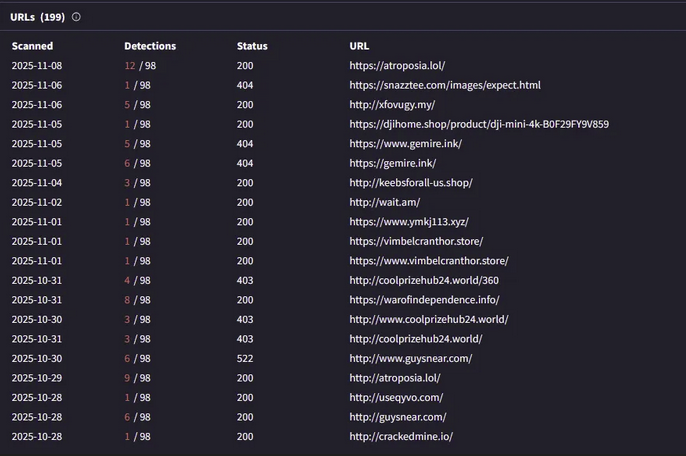
Further investigation of this IP (104.21.54.168) reveals numerous URLs associated with it.
In addition to Atroposia's network communication, researchers discovered another associated IP address (192.233.113.143).
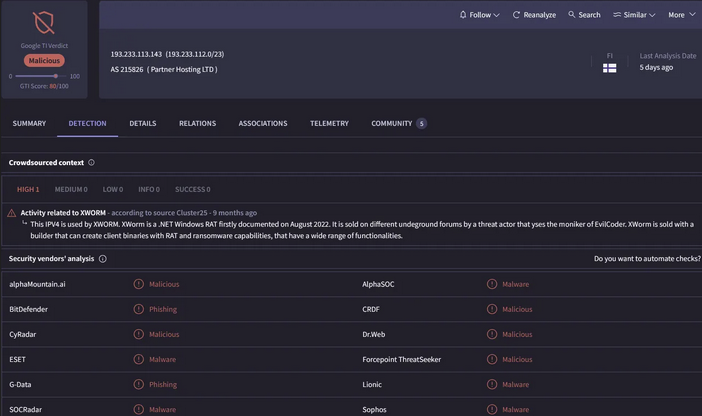
Analyzing the IP in virus total, there are numerous URLs listening on IP 192.233.113.143 via ports 7771, 7023, and 7777.
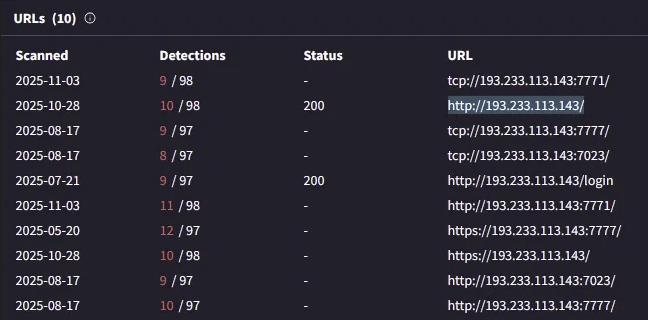
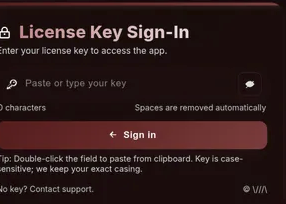
I navigated to the login site, which led directly to the Atroposia RAT login page.
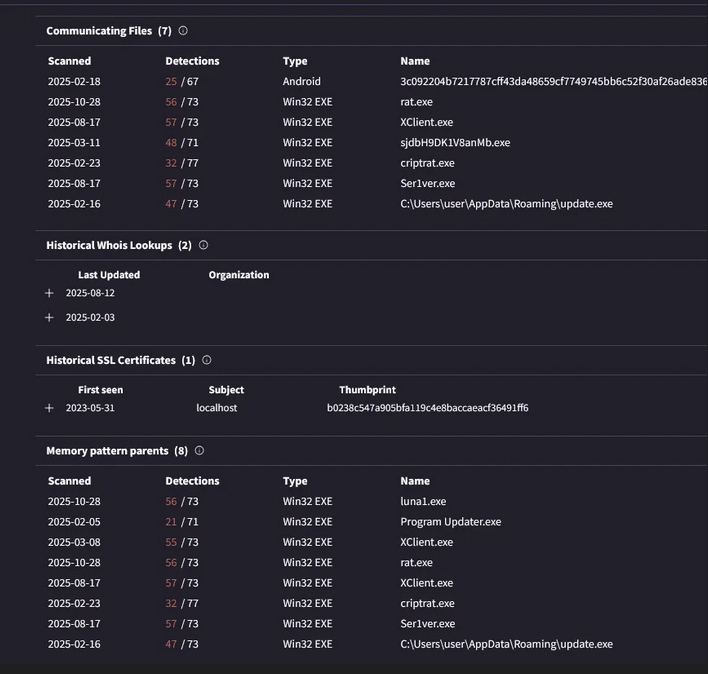
In addition to the connections associated with this IP, several malicious files communicate with it, including an APK file for Android. So far, the RAT has only been reported to infect Windows systems. These files share similar behavior patterns: they store collected data in a ZIP archive within the machine's memory before exfiltrating it to the C2, reducing their digital footprint.
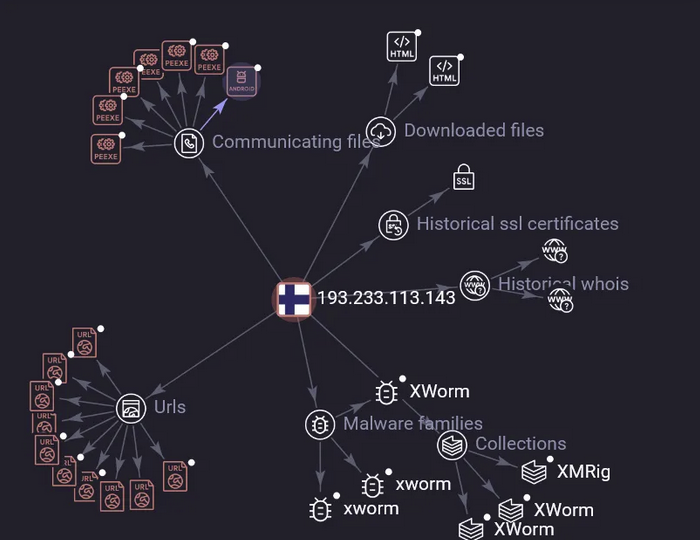
Below is a heat map of 192.233.113.143 showing the discovered URLs, HTML files, and EXE files that communicate with this IP.
Control Panel
The control panel and plugin builder make the tool easy to operate, lowering the technical expertise required to run complex attacks. The malware offers a vast array of features that threat actors can use to customize their payload.
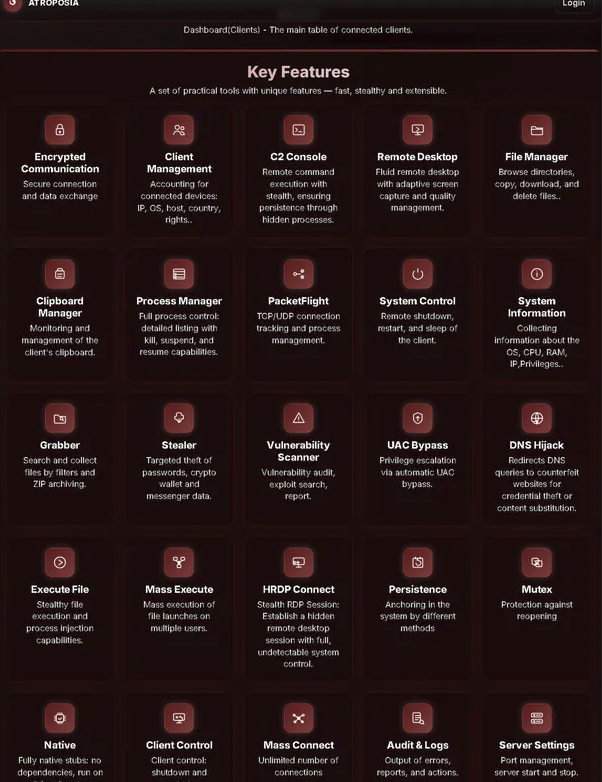
The following sections discuss each tool in detail. For additional technical analysis of these components, refer to the Varonis research blog.
Remote Desktop
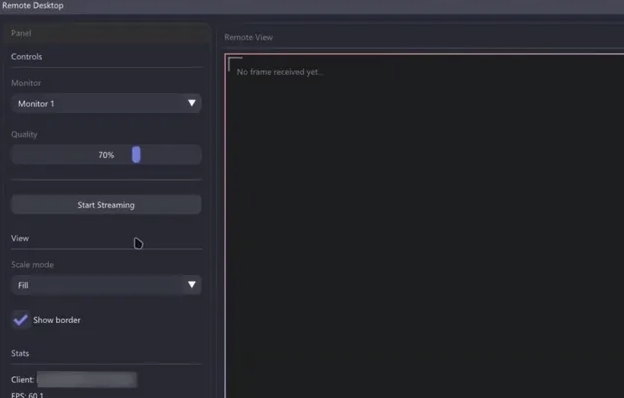
HRDP is one of Atroposia's primary capabilities—it creates a hidden remote desktop session without alerting the user. Once the machine is infected, the attacker spawns a hidden desktop session in the background. From the attacker's perspective, they can switch between monitors based on the number of screens the victim has. They can also scale the screen view and access a stats section showing data about the connected machine. This feature allows attackers to view sensitive documents and login credentials as the user accesses them.
File Manager/ Data Exfiltration
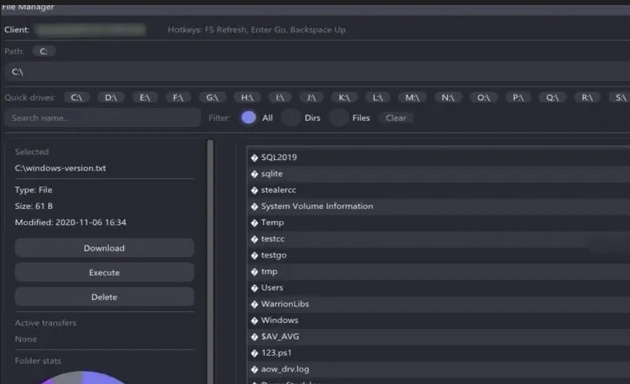
Atroposia includes a built-in file manager that gives attackers complete visibility into the victim's file system, including all drives and directories. Attackers can browse directories, collect sensitive files, and download, delete, or execute files on the victim's machine. Once they gather documents, source code, or databases, the data is compressed into a password-protected ZIP archive entirely in memory, evading EDR detection and minimizing their digital footprint.
In the screenshot below, the attacker accesses the client's machine and can choose which file path to explore. The "All" filter displays multiple options. On the left side, the attacker can select a file to view its details including type, size, and last modified date then download, delete, or execute it.
Plugin Builder
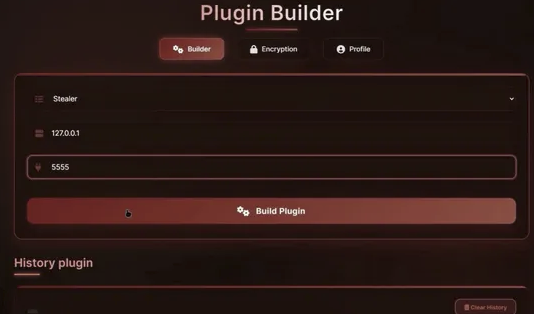
The Plugin Builder is a component of the Atroposia RAT that allows attackers to easily customize the specific features and capabilities of their payload. The Plugin Builder includes three sections:
- Builder
- Encrpytion
- Profile
The Builder section contains configurable options for the attacker to specify C2 settings and specific modules to include in the payload, such as:
- HRDP
- File Grabber
- Vulnerability Scanner
- DNS Hijack module
The encryption section contains configuration options where the attacker can define how the malware will encrypt its C2 communications.
DNS Hijacking
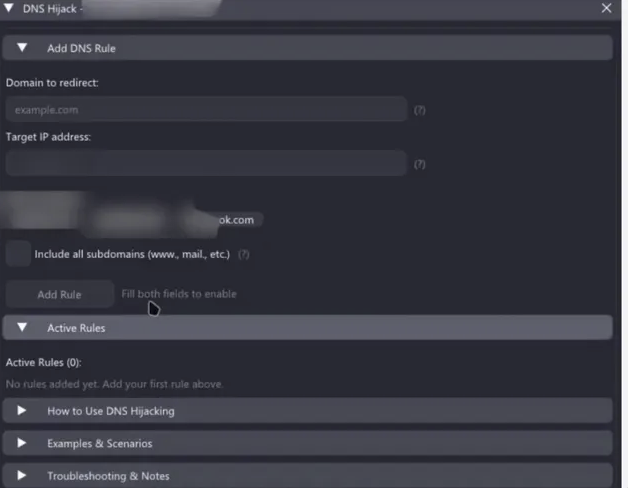
Atroposia can manipulate network traffic through its DNS hijack module, redirecting the infected system's DNS queries. The attacker enters a domain and specifies a fake IP address. Once added, any attempt by the victim's machine to reach that domain is silently rerouted to the attacker's chosen server.
Vulnerability Scanning/ Persistence Mechanisms
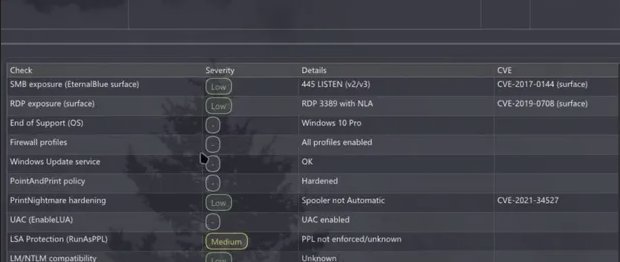
Atroposia's modular design includes a built-in vulnerability scanner that audits compromised systems to identify missing patches, misconfigurations, or exploitable software versions. This enables attackers to escalate privileges, often through automatic UAC bypass.
Atroposia’s Impact to the cyber landscape
Atroposia RAT affects the cyber landscape in several significant ways:
- Lowers the barrier to entry for cybercriminals
- The malware operates as a "turkey criminal toolkit" specifically designed to reduce technical expertise requirements for threat actors of varying skill levels. Its control panel and plugin builder make the tool easy to operate, allowing less sophisticated attackers to run complex attacks.
- Malware-as-a-Service model increases accessibility
- Atroposia is offered as a Malware-as-a-Service (MaaS) with affordable three-tier subscription pricing ($200 for 1 month, $500 for 3 months, $900 for 6 months). This pricing structure makes advanced attack capabilities accessible to a wider range of threat actors.
- Advanced evasion capabilities
- The RAT features sophisticated stealth operations including:
- Advanced persistence and evasion tactics
- Password-protected ZIP archives created entirely in memory to evade EDR detection
- Use of CDN to mask traffic and evade network detection
- Crypter to obfuscate binaries
- The RAT features sophisticated stealth operations including:
- Multi-functional threat platform
- The modular design allows threat actors to build custom payloads with various capabilities including credential theft, hidden RDP, vulnerability scanning, DNS hijacking, and file exfiltration. This versatility makes it a comprehensive tool for multiple attack scenarios.
- Professional infrastructure and support
- The developer offers customer support and additional services via public website and Telegram, providing a level of professionalism that enables even less experienced attackers to effectively deploy the malware.
Mitigation
Detection and Prevention
- Deploy Endpoint Detection and Response (EDR) platforms that can detect abnormal behavior, especially in-memory activity and hidden processes.
- Implement application whitelisting to allow only trusted and authorized programs to run on systems.
- Use browser hardening policies to block password storage in Chromium and Gecko-based browsers.
- Monitor for indicators of compromise including connections to known malicious IPs (104.21.54.168 and 192.233.113.143) and communications over TCP ports 7771, 7023, and 7777.
Access Control and Authentication
- Enable multi-factor authentication (MFA) to enhance access security across all critical systems.
- Manage privileged accounts and limit or block remote WMI connections by users to prevent lateral movement.
System Hardening
- Disable or restrict scheduled tasks, registry autoruns, and startup folder use unless essential for operations, as these are key persistence mechanisms.
- Monitor and alert on unusual registry changes indicating persistence or evasion attempts.
Network Security
- Enforce network segmentation and firewalls to block lateral movement and data exfiltration.
- Monitor DNS traffic for signs of DNS hijacking, as Atroposia can redirect DNS queries to attacker-controlled servers.
- Block or monitor CDN traffic patterns that may be masking malicious C2 communications.
User Awareness
- Conduct security awareness training focused on recognizing phishing emails, malicious attachments, and deceptive websites, as these are the primary infection vectors.
Threat Hunting
- Use YARA and Sigma rules to enhance threat hunting capabilities and detect Atroposia-specific patterns.
- Monitor for hidden desktop sessions and unusual remote desktop activity that could indicate HRDP exploitation.
- Watch for in-memory ZIP archive creation and password-protected archives being created, as these are used for data exfiltration.
Data Protection
- Conduct regular backups of critical data and systems, ensuring backup availability.
Conclusion
Atroposia RAT represents a significant evolution in the threat landscape, combining sophisticated technical capabilities with an accessible Malware-as-a-Service model that democratizes advanced cyberattacks. By offering a comprehensive suite of modules including hidden RDP, credential theft, vulnerability scanning, and DNS hijacking at an affordable price point starting at just $200 per month, Atroposia has effectively lowered the barrier to entry for cyber criminals of all skill levels.
What makes this threat particularly concerning is its sophisticated evasion capabilities, including in-memory ZIP archive creation, CDN traffic masking, and binary obfuscation, combined with professional infrastructure and customer support that rivals legitimate software services. The use of multiple command-and-control IPs and various communication ports further demonstrates the operational maturity behind this malware.
Organizations must adopt a multi-layered defense strategy to combat Atroposia. This includes deploying robust EDR solutions, implementing strict access controls with MFA, conducting regular security awareness training, and actively monitoring for indicators of compromise such as connections to known malicious IPs (104.21.54.168 and 192.233.113.143) and unusual remote desktop activity. As the MaaS model continues to proliferate, the cybersecurity community must remain vigilant and adaptive to counter this evolving threat that bridges the gap between amateur and professional cyber crime.
TTPs (Tactic, Technique, Procedures)
| Tactic | Technique ID | Description |
|---|---|---|
| Initial Access | T1566.001 | Phishing: Spearphishing Attachment - Spread through spam campaigns with malicious attachments (archive files, executables, PDFs, Office documents) |
| Initial Access | T1566.002 | Phishing: Spearphishing Link - Deceptive emails containing links to malicious websites or downloads |
| Execution | T1204.002 | User Execution: Malicious File - User opens malicious attachment or clicks link to execute the RAT |
| Defense Evasion | T1027.002 | Obfuscated Files or Information: Software Packing - Uses crypter to obfuscate binaries |
| Defense Evasion | T1140 | Deobfuscate/Decode Files or Information - Creates password-protected ZIP archives in memory to evade EDR detection |
| Defense Evasion | T1562.001 | Impair Defenses: Disable or Modify Tools - Uses CDN to mask traffic and evade network detection |
| Credential Access | T1555.003 | Credentials from Password Stores: Credentials from Web Browsers - Steals credentials from Chromium and Gecko-based browsers |
| Credential Access | T1056.001 | Input Capture: Keylogging - Monitors clipboard to copy login credentials and sensitive information |
| Credential Access | T1555 | Credentials from Password Stores - Exfiltrates wallet information from cryptocurrency sites |
| Discovery | T1046 | Network Service Discovery - Built-in vulnerability scanner identifies missing patches, misconfigurations, and exploitable software versions |
| Collection | T1005 | Data from Local System - Complete file system access for browsing and collecting sensitive files |
| Collection | T1115 | Clipboard Data - Monitors and collects clipboard data containing credentials |
| Collection | T1113 | Screen Capture - Hidden RDP (HRDP) allows viewing of user's desktop and applications |
| Collection | T1560.001 | Archive Collected Data: Archive via Utility - Compresses stolen data into password-protected ZIP archives |
| Command and Control | T1071.001 | Application Layer Protocol: Web Protocols - Establishes C2 connection over TCP ports (7771, 7023, 7777) |
| Command and Control | T1573 | Encrypted Channel - Configurable encryption options for C2 communications |
| Privilege Escalation | T1548.002 | Abuse Elevation Control Mechanism: Bypass User Account Control - Automatic UAC bypass to gain administrator rights |
| Persistence | T1053.005 | Scheduled Task/Job: Scheduled Task - Establishes persistence by installing scheduled tasks |
| Persistence | T1547.001 | Boot or Logon Autostart Execution: Registry Run Keys / Startup Folder - Uses registry autoruns for persistence |
| Exfiltration | T1041 | Exfiltration Over C2 Channel - Exfiltrates collected data through established C2 connection |
| Impact | T1565.001 | Data Manipulation: Stored Data Manipulation - Can download, delete, or execute files on victim's machine |
| Impact | T1557.001 | Adversary-in-the-Middle: LLMNR/NBT-NS Poisoning and SMB Relay - DNS hijack module redirects DNS queries to attacker-controlled servers |