
Inside XWorm 6.0: How the Backdoor Spreads, Persists, and Evades Detection

New versions of the XWorm backdoor are being distributed in phishing campaigns after the original developer, XCoder, abandoned the project in 2024. The latest variants—6.0, 6.4, and 6.5—are used by various threat actors and support plugins that enable a wide range of malicious activity. This report focuses on:
- Overview: What XWorm is, how it works, and why it matters
- Initial access & delivery: How infections begin (phishing, ClickFix, and loaders)
- Victimology: Who is being targeted and the likely motivations
- Capabilities: What’s new in v6.0 / v6.4 / v6.5 (plugins, data theft, and evasion)
- Technical analysis: File traits, execution flow, persistence mechanisms, and network behavior
What is XWorm
XWorm is a multi-functional remote access trojan (RAT) that first appeared in 2022 and has since become a widely used cybercriminal tool. It gives attackers unauthorized access and control over infected Windows systems. What makes XWorm notable is its modular "plugin" architecture, a core functionality is separate from other features. This design lets developers and threat actors add, remove, or update plugins without changing the core program. Attackers can select the capabilities they need, whether for data exfiltration or ransomware attacks.
XWorm Distribution
Threat actors using XWorm primarily distribute the malware through social engineering and sophisticated evasion techniques. Below are some of the tactics they use:
- Phishing: Threat actors send phishing emails with malicious URLs or attachments—such as documents or invoices—to trick users into executing them and beginning the infection process.
- ClickFix Technique: In various campaigns, threat actors use the "ClickFix" technique to redirect users to a typosquatted domain and display a fake error message. The attacker then provides instructions within the error message, telling the user to copy and paste a command into their Windows command prompt. This executes the malicious payload.
- Loaders: In many cyber campaigns, threat actors use loaders to bypass an organization's security defenses.
XWorm Capabilities
The last confirmed version developed by XCoder is 5.6. Reported XWorm capabilities include:
- Collecting sensitive information
- Credential theft (e.g., stored passwords)
- Financial data theft
- Keylogging
- Clipboard data theft
XWorm V6.0
In late October 2025, researchers discovered a new version of the XWorm variant being advertised on a hacker forum by an account named "XCoderTools." The developer offered lifetime access to the malware for $500. However, I am uncertain whether this account belongs to the original developer (XCoder). In the post describing the new variant, the developer claims that XWorm 6.0 resolves the RCE vulnerability found in version 5.6 and includes 35 additional plugins with enhanced data theft capabilities. Since the new XWorm variant emerged, multiple samples have been detected on VirusTotal, indicating that cybercriminals are increasingly adopting this stealer for their phishing campaigns.
XWorm File Analysis
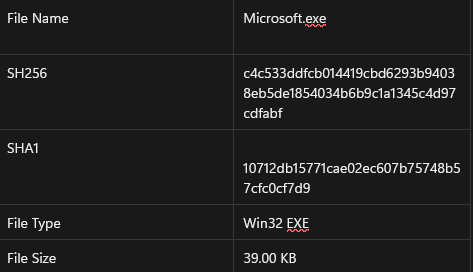
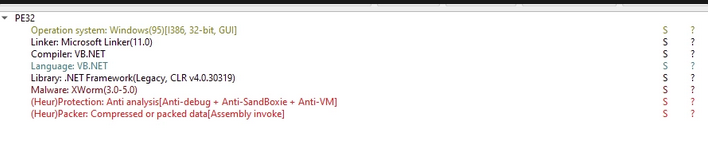
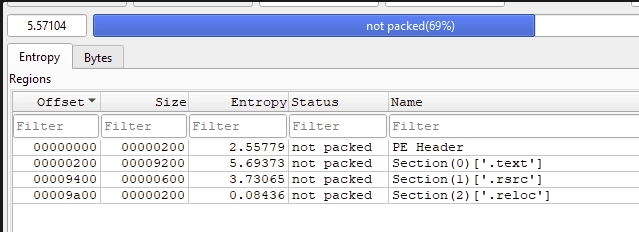
The sample we collected is disguised as a legitimate Microsoft file. Analysis revealed that the application is a 32-bit program written in Visual Basic .NET using the .NET framework. Regarding the file's entropy, 31 percent of the application is obfuscated, with the .text section having the highest entropy at 5.69.
Imports
I loaded the file in IDA Pro to examine its structure. After loading, the only obvious code is a small start stub that immediately transfers execution to _CorExeMain in mscoree.dll.
This is typical for a managed (.NET) executable: the native PE entry point contains little to no “real” logic and simply hands control to the .NET runtime. When Windows starts the program, it calls the PE entry point, which then calls into mscoree.dll and passes execution to _CorExeMain. From there, _CorExeMain:
- Initializes and loads the Common Language Runtime (CLR) into the process (selecting the appropriate CLR version based on metadata / system configuration)
- Parses .NET metadata (e.g., the assembly manifest and method tables) to locate the managed entry point (typically the assembly’s Main method)
- Invokes that managed entry point under the CLR, where the program’s core logic runs
Because of this handoff, you generally won’t see meaningful malware behavior in the initial native stub unless the sample includes additional native code for anti-analysis or custom loading. The next step is to treat the sample as a .NET assembly and inspect it with a managed-code tool (e.g., dnSpy, ILSpy, dotPeek) or use IDA with a .NET-aware plugin to jump to the managed Main method and follow execution from there. Malware authors often take advantage of this structure to complicate static analysis: the PE looks minimal in native disassembly while the malicious functionality resides in managed code, frequently obfuscated or packed.
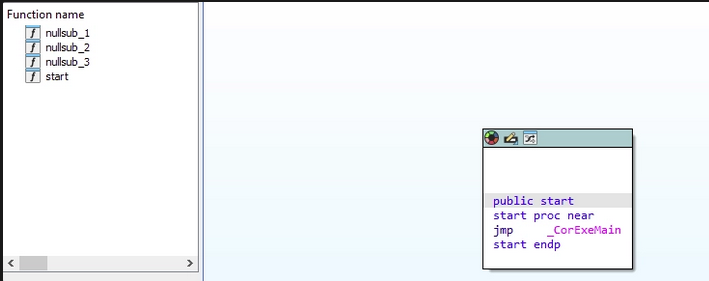
This is the only import used, which raises significant suspicion. Threat actors use the _CorExeMain function to disguise and execute malicious .NET code. They leverage its role in loading the Common Language Runtime (CLR)—the main virtual component of the .NET framework—to bypass detection.

Strings
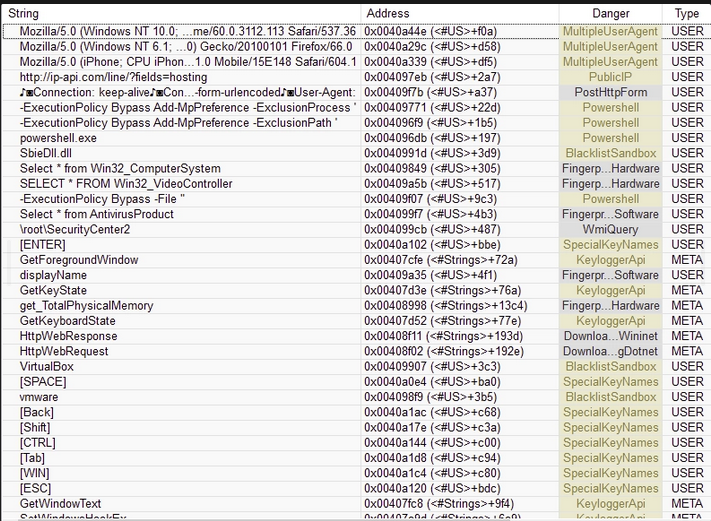
I identified multiple suspicious strings within the sample, including sandbox-detection checks, system-enumeration routines used to identify installed security software, and PowerShell commands that add exclusions to weaken endpoint defenses.
XWorm Execution
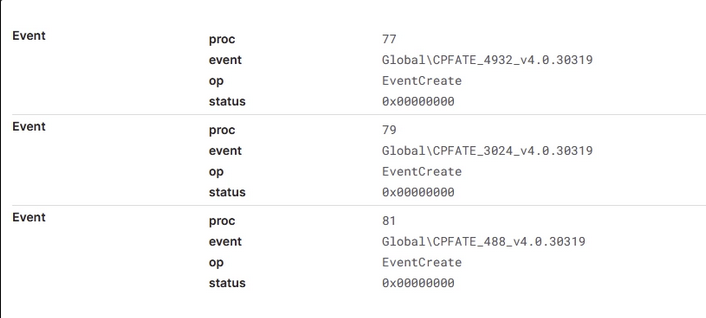
When the file executes, it creates a mutex to prevent reinfection. A PowerShell script (the loader) then runs and modifies Microsoft Defender Antivirus settings to exclude the malicious file from real-time protection. The PowerShell command relies on the Common Language Runtime (CLR) and uses an Anti-Malware Scan Interface (AMSI) bypass technique. AMSI is a Windows feature that allows security products to inspect script-based and other dynamic code before execution.
Since XWorm is .NET-based malware, the code runs within the CLR environment. To execute without detection, the loader—a PowerShell script—searches for the clr.dll file and modifies the AmsiScanBuffer function by replacing its instructions with null bytes. This disables AMSI's ability to scan the XWorm payload.

Persistence and Evasion
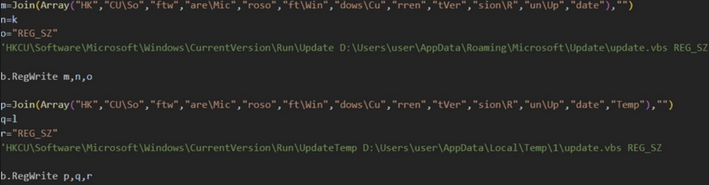
XWorm 6.0 maintains persistence by storing itself in both the TEMP and APPDATA folders and adding these paths to the registry.
Another feature observed in newer XWorm builds is an anti-removal technique that makes the malware harder to stop by marking its own process as critical. On Windows, “critical” (a.k.a. break-on-termination) processes are treated as essential to system stability; if such a process is terminated, Windows can bugcheck (Blue Screen) rather than continue running in a potentially unstable state. This creates a strong deterrent against defenders and victims attempting to kill the process.
At a high level, this behavior typically looks like:
- Privilege check: The malware first checks whether it is executing in an elevated context. In .NET, this is commonly done by inspecting the current security principal and verifying membership in WindowsBuiltInRole.Administrator (RID 544). If the check fails, the malware may skip the technique, fall back to persistence-only behavior, or attempt privilege escalation depending on the campaign.
- Enable required privileges: When running as admin, malware often calls APIs equivalent to enabling SeDebugPrivilege (sometimes surfaced as “EnterDebugMode”) so it can open protected process handles and modify process-level flags.
- Set critical-process flag: With sufficient access, the malware invokes native routines (commonly via ntdll) to set a “critical” flag on its own process. Once set, attempts to terminate it—especially by non-elevated users—may fail, and forced termination by an elevated user can crash the host.
From a defender’s perspective, the intent is clear, the malware increases dwell time by making remediation disruptive , buys the operator time to complete theft/exfiltration, and complicates live-response actions. In this sample, the technique also pairs well with the Run-key persistence described above, even if the system crashes or is rebooted after a forced stop, the malware can be restarted automatically at logon via the registry. Practically, this pushes responders toward “safer” containment workflows instead of interactive process-kill attempts on a live, connected endpoint.
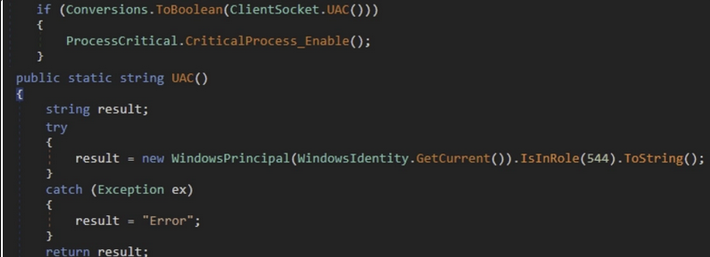
If XWorm is executed with administrator privileges, it invokes EnterDebugMode to enable SeDebugPrivilege, permitting it to flag the XWorm process as critical. Users cannot terminate a critical process without administrator privileges. If an elevated user forcefully stops it, the system will crash and require a reboot, upon which XWorm will be started again using the registry run key.
Network Traffic/ Security Checks
In addition to executing the PowerShell script, the loader performs security checks and enumerates the system to gather information, while also ensuring it is not running under a debugger. It then sends this data back to the C2 server. If it detects a debugger or a sandbox environment, the infection terminates. XWorm also connects to ip-api[.]com and uses the IP-API service to determine whether the device’s IP address is associated with data centers or hosting providers such as Any.run, VMware, and VirtualBox. If any of these environments are detected, the XWorm process terminates.
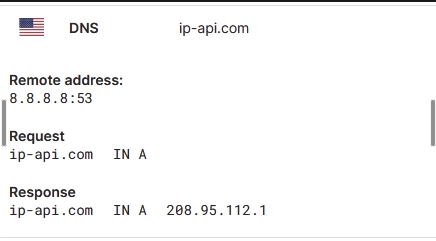
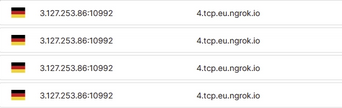
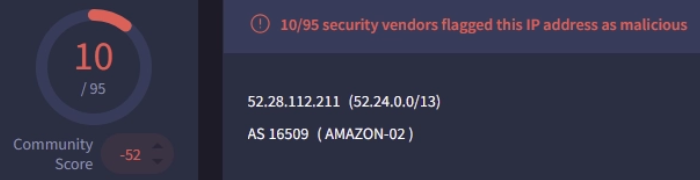
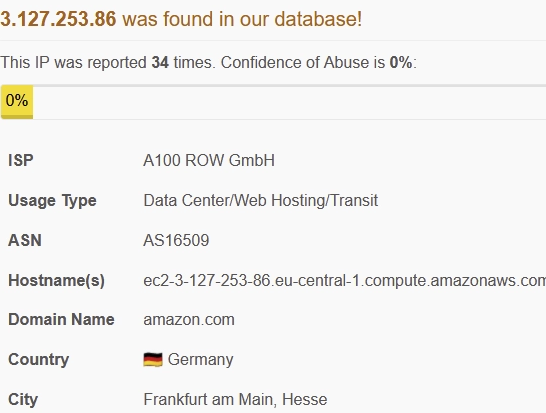
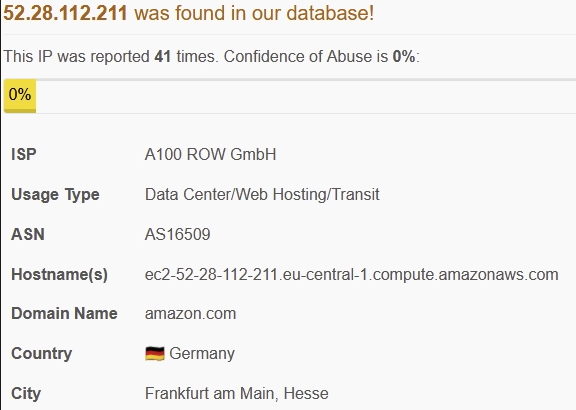
XWorm communicates with its C2 server via a direct TCP socket connection, reaching out to two destination IPs (3.127.253.86 and 52.28.112.211) through port 10992 after DNS requests are made.
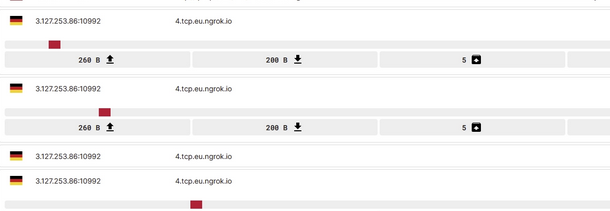
Looking further into the traffic, we see that our compromised machine is sending 5 packets back to the Ips.
Domain and IP details
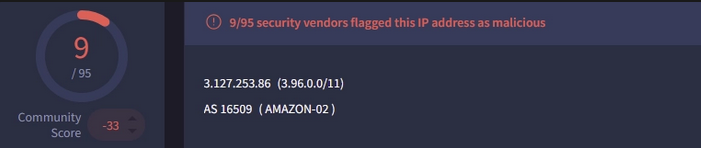
In regards to the domain and IPs being used, the Domain that is being queried is ngrok[.]io, and threat actors use this domain because its a legitimate tool that provides a secure tunnel, allowing them to remotely access systems behind firewalls or on local networks, and hide their C2 servers. The IP addresses that the infected machine is communicating with is originating from Germany.

Remediation
Based on the XWorm 6.0 analysis, here are key remediation steps organizations can implement:
Prevention and Detection
- Email Security: Implement robust email filtering to block phishing campaigns that deliver XWorm via malicious URLs, attachments, or the ClickFix technique
- Endpoint Detection and Response (EDR): Deploy EDR solutions capable of detecting abnormal behavior, including AMSI bypass techniques and critical process manipulation
- User Awareness Training: Train employees to recognize phishing attempts, fake error messages, and social engineering tactics used to distribute XWorm
Technical Controls
- Monitor PowerShell Activity: Watch for suspicious PowerShell scripts that modify Windows Defender exclusions or disable AMSI scanning
- Registry Monitoring: Track registry modifications in TEMP and APPDATA folders, especially Run keys used for persistence
- Network Security: Block or monitor connections to ngrok.io domains and associated C2 IPs (3.127.253.86, 52.28.112.211) on port 10992
- Application Whitelisting: Restrict execution to authorized programs only to prevent unauthorized malware from running
- Multi-Factor Authentication: Enable MFA across all critical systems to protect against credential theft
Response Strategy
- Threat Intelligence Monitoring: Stay updated on XWorm variants and new plugins being added by threat actors
- Incident Response Preparedness: Develop and maintain response procedures for XWorm infections
- Proactive Threat Hunting: Search for indicators like the file hash (SHA256: c4c533ddfcb014419cbd6293b94038eb5de1854034b6b9c1a1345c4d97cdfabf) and mutex creation patterns
Conclusion
XWorm 6.0 represents a significant evolution in the malware-as-a-service landscape, demonstrating sophisticated evasion techniques and enhanced capabilities that pose serious threats to organizations worldwide. Its modular architecture, combined with the ability to bypass modern security defenses through AMSI manipulation and critical process designation, makes it particularly dangerous.
Key findings from this analysis show that XWorm 6.0 employs multiple layers of protection, including anti-debugging checks, sandbox detection via IP-API services, and the abuse of legitimate tools like ngrok.io to mask C2 communications. Its persistence mechanisms—using registry modifications and critical process flags—help maintain long-term access to compromised systems, even after reboot attempts.
The widespread adoption of XWorm 6.0 by cybercriminals, evidenced by numerous VirusTotal submissions, suggests this threat will continue to grow. Organizations must implement multi-layered security controls, including robust email filtering, endpoint detection and response solutions, and user awareness training to combat phishing campaigns that serve as the primary distribution vector.
As threat actors continue to refine XWorm with additional plugins and capabilities, security teams must remain vigilant and proactive. The combination of technical controls, threat intelligence monitoring, and incident response preparedness will be critical to mitigating the risks posed by this evolving threat.
TTPs (Tactics, Techniques, and Procedures)
| Tactic | Technique / Sub-technique | Procedure | Telemetry | Detection ideas |
|---|---|---|---|---|
| Initial Access | T1566.001 / T1566.002 (Phishing) | User receives a lure email that delivers the payload via attachment (doc/invoice) or link that leads to the dropper/loader. | Mail gateway logs (URLs/attachments), email client spawning Office/PDF viewer, download events to user-writable dirs, Mark-of-the-Web (MOTW) on files. | Correlate inbound email → new file with MOTW → first execution; alert on Office spawning script hosts/PowerShell; block known risky attachment types where feasible. |
| Execution | T1204.002 (User Execution) | User is socially engineered to run/open the malicious file (or run a pasted command in “ClickFix” flow). | Explorer.exe / browser.exe launching cmd.exe / powershell.exe; console host activity; clipboard usage preceding shell execution. | Detect interactive shells spawned from explorer.exe with suspicious command-lines (encoded, IEX, download cradle, long one-liners). |
| Execution | T1059.001 (PowerShell) | PowerShell loader runs to stage follow-on actions (Defender exclusions + AMSI bypass + execution of payload). | PowerShell ScriptBlockLogging (Event ID 4104), Module logging (4103), process command line, AMSI events (if available), PowerShell network connections. | Alert on PowerShell changing Defender preferences, touching AMSI-related strings, or writing/starting binaries from %TEMP%/%APPDATA%. |
| Defense Evasion | T1562.001 (Modify security tools) | Adds Microsoft Defender exclusions so the dropped payload won’t be scanned. | Defender operational logs, registry/config changes, PowerShell commands like Add-MpPreference / Set-MpPreference, new exclusion paths. | Alert on new exclusions that point to user-writable dirs or newly-created binaries; restrict who can set exclusions; baseline approved exclusions. |
| Defense Evasion | T1562.001 (AMSI impairment) | Patches/overrides AMSI scanning (AmsiScanBuffer) so malicious script content is not inspected before execution. | PowerShell ScriptBlock containing “amsi”, “AmsiScanBuffer”, reflection/interop to patch memory; suspicious memory permissions changes in PowerShell process. | Hunt for known AMSI bypass patterns (string/ETW), and for PowerShell that loads/patches amsi.dll; block unsigned PowerShell and enforce Constrained Language Mode where possible. |
| Persistence | T1547.001 (Run keys) | Copies itself to %TEMP% and/or %APPDATA% and creates a Run key value pointing to the malware path. | Registry set events for HKCU/HKLM\Software\Microsoft\Windows\CurrentVersion\Run; file creation in %APPDATA%/%TEMP%; first-run timestamp alignment. | Alert on new Run entries where the target is in %TEMP% or has suspicious names (e.g., Microsoft.exe) and is unsigned/untrusted. |
| Defense Evasion | T1036.005 (Masquerading) | Uses a benign-looking filename (e.g., “Microsoft.exe”) to blend into the environment. | File metadata (publisher absent), signature validation failures, unusual execution path (Downloads/AppData/Temp), low import table for managed stub. | Detect “Microsoft*.exe” (or other vendor-like names) executing from user-writable paths; require signed binaries for certain directories via WDAC/AppLocker. |
| Discovery | T1518.001 / T1082 | Enumerates installed security software and system details to tailor behavior and avoid detection. | WMI queries (e.g., AntiVirusProduct), registry reads for security product keys, process/service enumeration, OS/hardware discovery calls. | Correlate security-software enumeration followed by immediate C2 beacon; watch for abnormal WMI usage from newly dropped binaries. |
| Defense Evasion | T1622 (Debugger Evasion) | Performs anti-debug checks and terminates if a debugger is detected. | API usage patterns (IsDebuggerPresent / CheckRemoteDebuggerPresent / NtQueryInformationProcess), timing checks, environment inspection. | Hard to alert on directly; use it as an enrichment signal when combined with other malware behaviors (persistence + C2 + AMSI bypass). |
| Defense Evasion | T1497.001 (Virtualization/Sandbox checks) | Calls ip-api[.]com and checks whether the public IP looks like a data center/analysis platform; exits if suspicious. | DNS query / HTTPS traffic to ip-api[.]com from the malware/loader process; short-lived execution with early exit; minimal post-check behavior. | Alert on non-browser processes querying ip-api[.]com; if ip-api is rarely used in your environment, treat it as a strong anomaly signal. |
| Command and Control | T1095 (Raw TCP) / T1090 (Proxy/relay via ngrok) | Establishes outbound TCP to C2 (port 10992 observed) and may leverage ngrok tunnels to mask backend infrastructure. | Netflow (dst IP/port), DNS to ngrok[.]io, TLS SNI/JA3 fingerprints, repeated small packet patterns (“beacon-like”). | Block/monitor TCP/10992 where not required; baseline and alert on ngrok usage; build detections for repeated low-volume beacons to rare destinations. |